Template Governance
The Docentric Implementation Guide explains how to select a template strategy and storage, build and test reports, and move the solution through DEV, TEST/UAT and PROD.
This chapter goes one step further and explains how to govern Docentric templates throughout their lifecycle:
- Who owns the template and its data source?
- Who is allowed to change templates?
- Where are templates stored?
- How are template versions controlled?
- How are template changes reviewed and approved?
- How is an approved template promoted to Production?
- How can you return to an earlier version?
There is no single Template Governance model that fits every customer. The right model depends mainly on who maintains the templates, where they are stored, and how strictly template changes need to be controlled.
A System Template stored as an AOT Resource can be versioned in Git/Azure DevOps and deployed together with application code. A template stored in SharePoint can use SharePoint version history and approval. Azure Blob Storage and File System provide template storage, but do not by themselves provide the same document versioning and approval process as SharePoint.
1. Decide who owns the data and who owns the template
Docentric separates preparing report data from designing the document. This allows different roles to own these two parts of a report.
Role: Developer
When an SSRS-based data source is used, a developer can add or reshape data using X++, typically in the report-specific Docentric DSP class.
This is also the approach used by Docentric SSRS Replicas. They provide ready-to-use Docentric templates for standard D365FO reports together with DSP classes that reshape the report data into a structure that is easier to use in templates.
When additional data is needed, the developer can extend the DSP class without changing the Word template.
Role: Functional Consultant
When an ER-based data source is used, a Functional Consultant or ER specialist can add or reshape data through ER Data models and Model mappings, without X++ development.
A Functional Consultant can also design and maintain Docentric templates.
Role: Business User
Once the required data is available in the template data source, designing a Docentric template does not require X++ development.
A trained business user who understands the business document, the available data, and Microsoft Word or Excel can design and maintain the template.
- Partner / Developer → data source
- Customer Functional Consultant / Business User → template design and maintenance
Decide this ownership during Stage 2 of the Implementation Methodology, before creating a large number of templates. Define not only who creates the data sources and templates during implementation, but also who will maintain them after Go-Live.
2. Understand Docentric template types and storage
Docentric supports System Templates, Customized System Templates and Custom Templates.
The template type and its storage are important for Template Governance because they determine how the template is maintained, versioned and moved between environments.
Template type: System Templates
System Templates are stored as AOT Resources.
Docentric SSRS and CBD Replicas are delivered with System Templates. Customers and partners can also create their own System Templates.
Because the template document is an AOT Resource, it follows the normal D365FO development and ALM process:
Template change → Git/Azure DevOps → Build → Deploy → Reload System Templates
This means that the template can be kept in source control, reviewed together with other development changes, and deployed through the normal application deployment process.
After the AOT Resource has been deployed to the target environment, use Reload system templates to populate or update the corresponding System Templates in Docentric report setup.
System Templates are a good choice when template changes should be controlled as part of the application development lifecycle.
Template type: Customized System Templates
A Customized System Template starts from an existing System Template, but its document is customized and stored outside AOT Resources - in SharePoint or Azure Blob Storage.
This is a common scenario with Docentric SSRS and CBD Replicas. For example, a customer can start with the Docentric Sales Invoice System Template and customize it with its own layout, additional fields or other document-specific changes.
Docentric Sales Invoice System Template
↓ customize
Customer Sales Invoice Customized System Template
The original System Template remains available as the baseline. The customized template can then be maintained independently of the original AOT Resource.
Its versioning and approval process depends on where the customized template is stored, for example in SharePoint or Azure Blob Storage.
Template type: Custom Templates
A Custom Template is created without an underlying System Template.
For example, a customer can create a completely new Docentric template for a custom report or add another template to an existing report in Docentric report setup.
Unlike System Templates, which are stored as AOT Resources, Custom Templates are stored in Azure Blob Storage, SharePoint or File System.
Their lifecycle is therefore independent of the application deployment lifecycle.
Storage is part of the governance decision
When deciding how a template should be maintained, do not decide only whether it should be a System, Customized System or Custom Template. Also decide where its document will be stored.
The main options are:
- AOT Resource for System Templates that should follow source control and the normal application deployment process.
- SharePoint when templates are maintained outside AOT and SharePoint versioning, permissions and approval can be used.
- Azure Blob Storage when templates should be stored centrally outside AOT and changed independently of application deployments.
- File System for on-premises scenarios.
The storage decision also determines how template versioning works. This is covered in the next chapter.
3. Versioning depends on template storage
Docentric does not introduce a separate versioning system for templates. Template versioning follows the selected template storage.
This means that the version history, rollback and approval process are different depending on whether the template is stored as an AOT Resource, in SharePoint, Azure Blob Storage or File System.
AOT Resources: Git/Azure DevOps
For System Templates stored as AOT Resources, use the same source-control process as for other D365FO application artifacts.
Change template → Commit to Git → Review → Build → Deploy to TEST/UAT → Deploy to PROD
Git/Azure DevOps keeps the history of changes and allows the team to return to an earlier committed version of the template.
This keeps template versioning together with the application development lifecycle.
SharePoint: Document versioning and approval
For templates stored in SharePoint, use SharePoint version history to keep track of template changes.
Depending on how the SharePoint document library is configured, SharePoint can provide:
- version history,
- major and minor versions,
- check-in and check-out,
- permissions,
- approval,
- and restoring an earlier version.
This makes SharePoint particularly useful when templates are maintained by Functional Consultants or business users and the customer wants a controlled review and approval process without putting the templates into AOT.
We will look at a concrete SharePoint governance process in the next chapter.
Azure Blob Storage
Azure Blob Storage allows templates to be stored centrally outside AOT and maintained independently of application deployments.
However, storing a template in Azure Blob Storage does not by itself provide the same document versioning and approval process as SharePoint.
If Azure Blob Storage is selected, the customer should therefore define how approved versions are identified, how previous versions are retained if required, and how template changes are controlled before they reach Production.
File System
File System storage can be used in supported on-premises scenarios.
As with Azure Blob Storage, the storage itself should not be treated as the template governance process. If version history, approval or rollback is required, the customer needs to define how these are handled.
Define template versioning together with storage
- AOT Resource → Git/Azure DevOps
- SharePoint → SharePoint versioning and approval
- Azure Blob Storage / File System → customer-defined versioning and approval process
Do not wait until templates are already in Production to decide how previous versions will be kept or how an incorrect change will be rolled back.
4. Use SharePoint for template versioning and approval
When Functional Consultants or business users maintain templates, SharePoint can be used not only as template storage, but also for versioning, review, approval and rollback.
Docentric uses the template from the configured SharePoint location, while SharePoint manages the document lifecycle.
Draft → Review → Test → Business Review/UAT → Approve → PROD
The exact process can be simpler or more formal depending on the customer.
(A) Draft and versioning
A Template Editor changes the template during normal template development.
Instead of manually creating files such as:
SalesInvoice_v12_FINAL_FINAL.docx
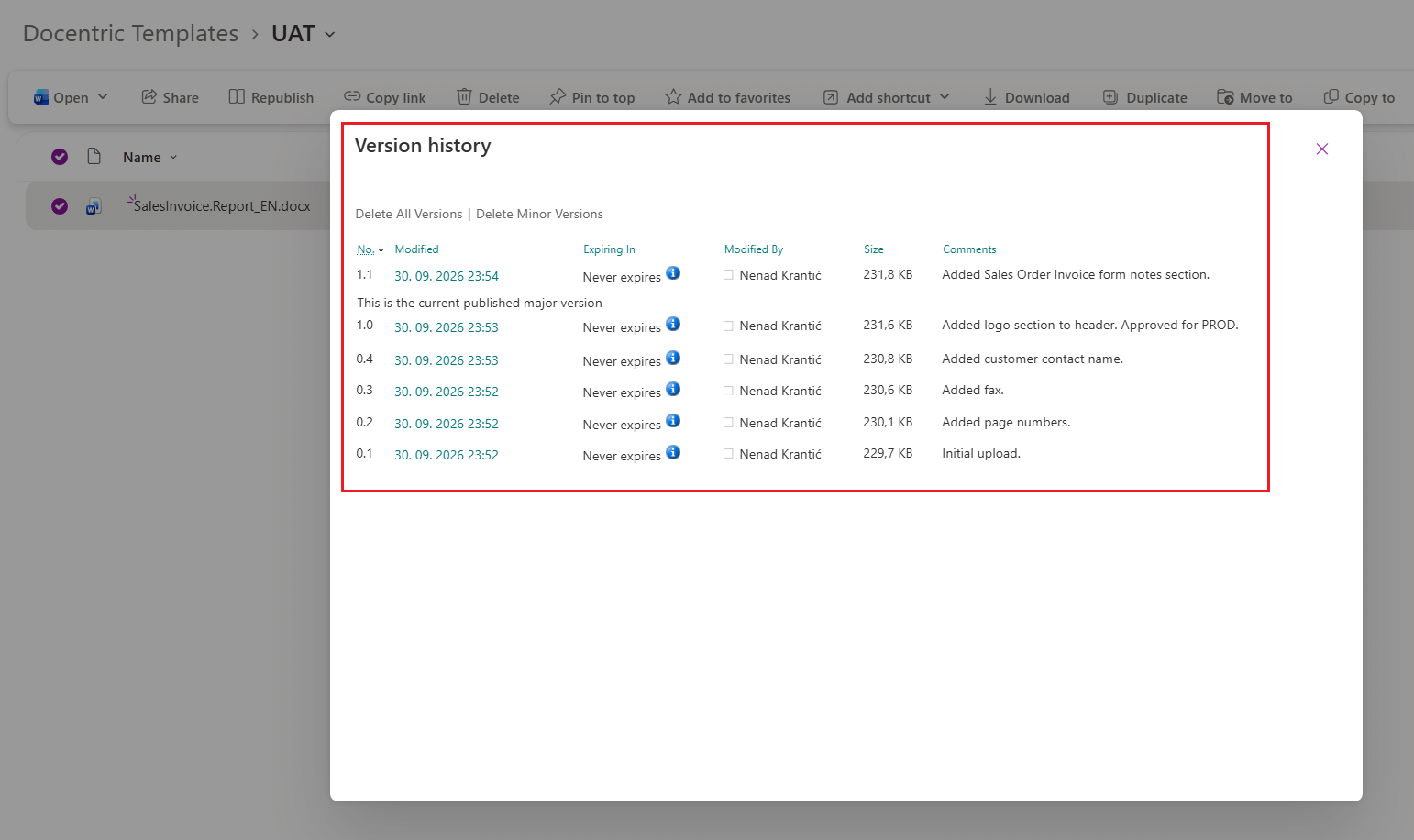
the template can keep the same name while SharePoint version history keeps track of its changes.
Depending on the SharePoint document library configuration, the customer can also use major and minor versions and check-in/check-out. This gives the team a history of the template without having to manage multiple copies of the same file manually.
(B) Review and test
Before a new version is approved, it should be reviewed and tested.
For example:
Template Editor → Functional Consultant → Business Document Owner
The Template Editor prepares the change. A Functional Consultant can review the template and test it in D365FO. The Business Document Owner can then verify that the resulting document meets the business requirements.
A smaller customer may combine these responsibilities. A larger or regulated organization may require several reviewers or a more formal approval process.
The minimum tests that should be completed before approval are covered in the Pre-Go-Live Template Checklist chapter.
(C) Approval
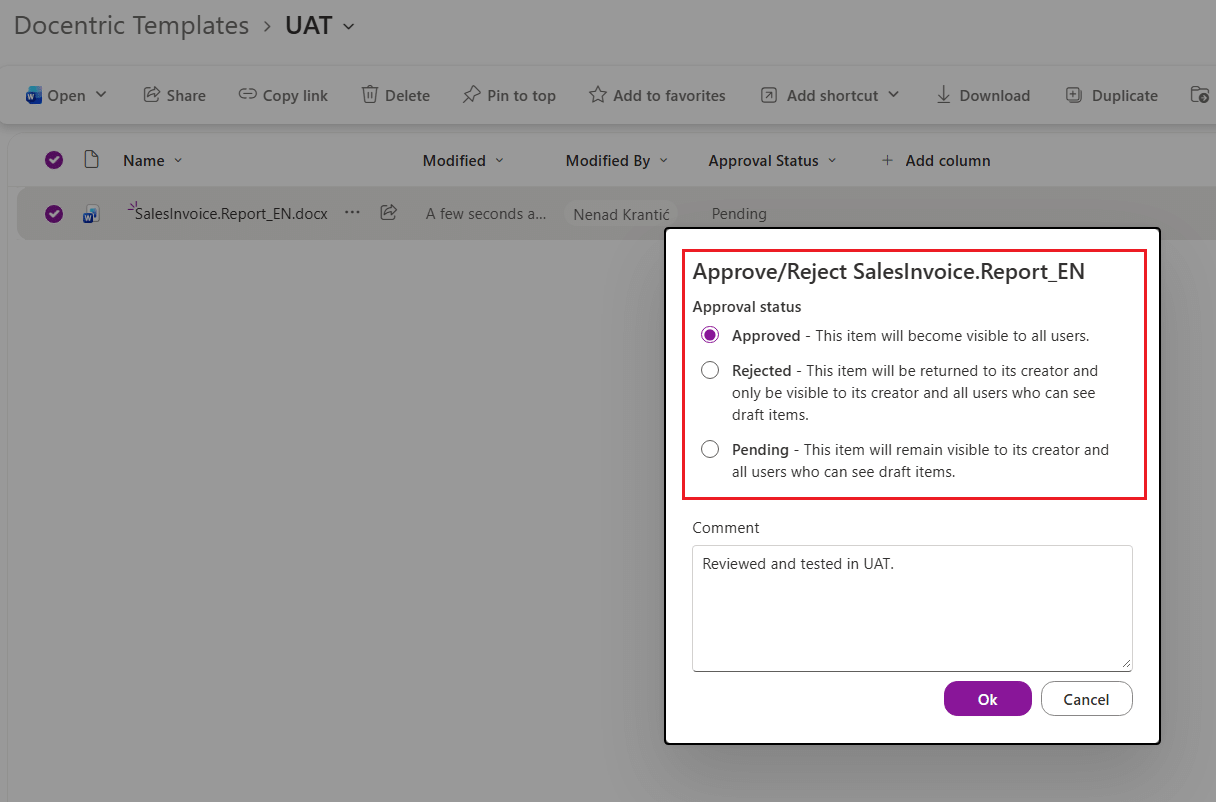
After the template has been reviewed and tested, the customer can mark it as the approved version using the approval process configured in SharePoint.
- Docentric AX manages the template and uses it when generating documents.
- SharePoint manages the template version history and, when configured, the approval process.
Docentric therefore does not need a second, separate approval workflow for a template whose lifecycle is already governed in SharePoint.
(D) Promote to Production
Approval and promotion to Production are two separate steps.
Approval identifies the template version that is ready for Production. How that approved template is promoted to the Production environment depends on the customer's environment and template storage setup.
For example, a customer may use separate SharePoint locations for TEST/UAT and PROD. In that case, the approved template needs to be moved to the Production location.
The different ways of moving approved templates between environments are covered in Move Approved Templates Between Environments.
This separation prevents a template from becoming a Production template simply because somebody saved a new version.
(E) Rollback to an earlier version
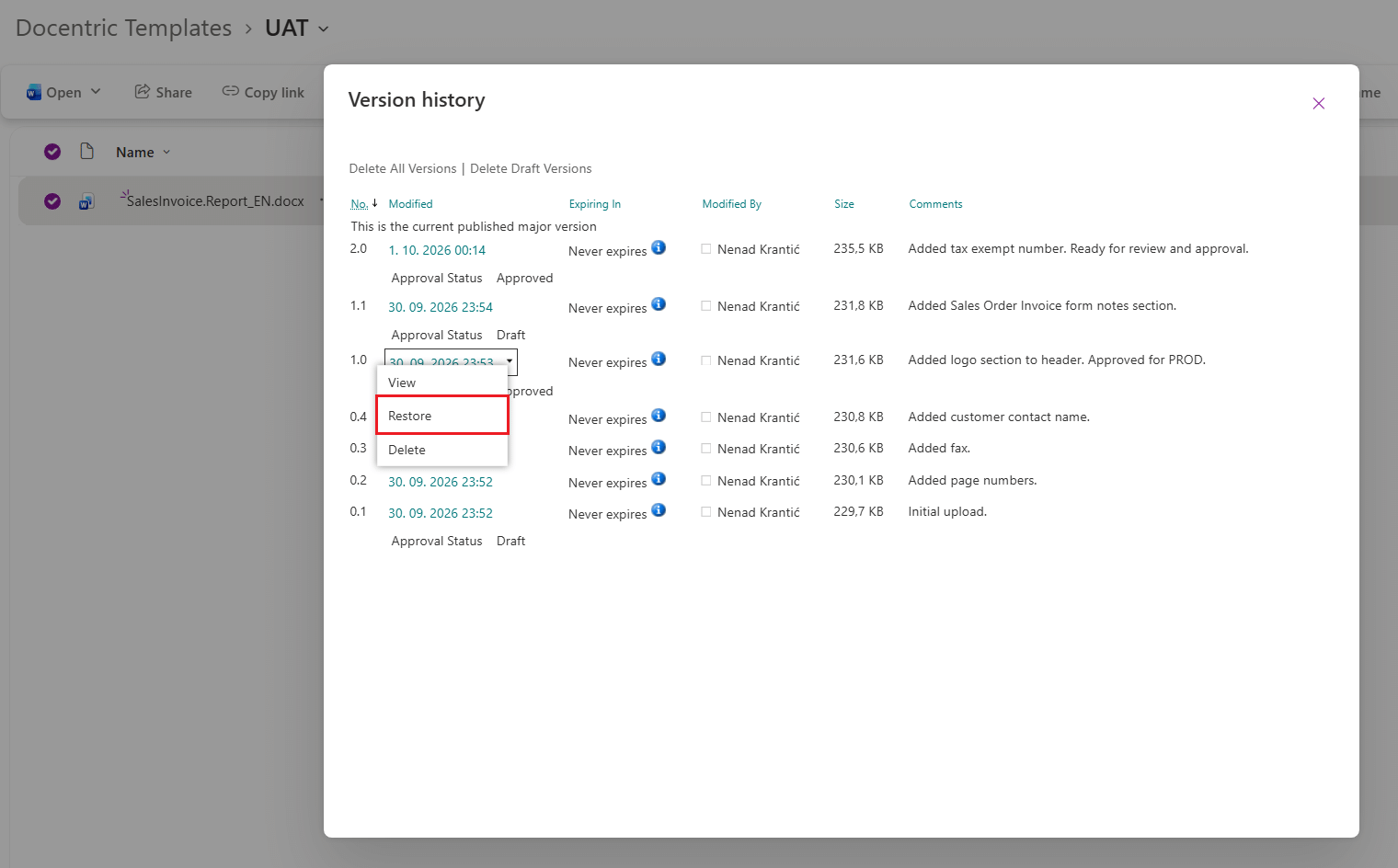
If a newly released template causes a problem, SharePoint version history can be used to find and restore an earlier approved version.
For this reason, customers should keep previous approved Production versions instead of deleting them when a new version is released.
A simple rule can be:
Current approved version → Production
Previous approved version(s) → available for rollback
SharePoint permissions
SharePoint permissions should follow the same ownership model defined for the templates.
For example:
- users who only execute reports need access to read the template,
- Template Editors need access to modify the template,
- reviewers or approvers need the permissions required by the customer's SharePoint approval process.
SharePoint permissions and Docentric security are related, but they are not the same thing.
Docentric security controls what the user can do with templates and Docentric report setup in D365FO.
Docentric security is covered in the next chapter.
For the technical setup of SharePoint template storage, including the Site URL, Folder path and required permissions, see SharePoint Template Storage.
5. Control who can change templates
Template Governance should also define who is allowed to change templates and related Docentric configuration.
SharePoint permissions control access to template documents stored in SharePoint. Docentric security controls what users can do with templates and Docentric report setup inside D365FO.
Security role: Docentric AX Template Editor
The Docentric AX Template Editor role is intended for users who design and maintain Docentric templates.
For example, this can be a Functional Consultant or a trained business user responsible for maintaining Sales Invoice, Purchase Order or other business document templates.
The user can work with templates without being given full Docentric administration rights.
Security role: Docentric AX Power User
The Docentric AX Power User has broader access to Docentric functionality and configuration than a Template Editor.
This role is suitable for users who, besides maintaining templates, also need to work with broader Docentric report setup and configuration.
Security role: Docentric AX Administrator
The Docentric AX Administrator has full access to Docentric configuration and securable artifacts.
This role should therefore be reserved for users who are responsible for Docentric administration, rather than assigned simply because somebody needs to edit a template.
Restrict template access by Legal Entity
Giving a user the Template Editor or Power User role does not necessarily mean that the user needs access to all templates.
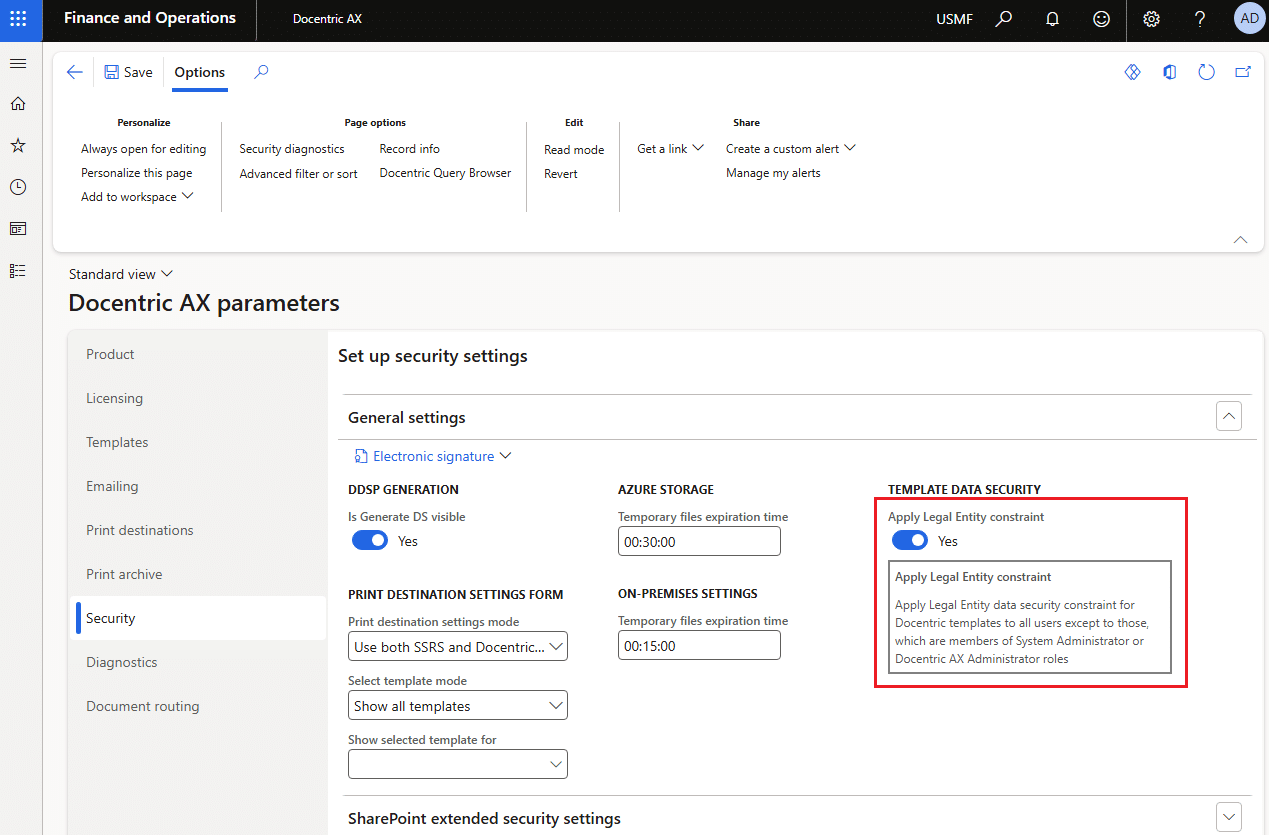
Docentric Template Data Security can further restrict which templates these users can work with.
For example, the Legal Entity constraint can restrict users to templates associated with the legal entities they are allowed to work with.
This makes scenarios such as the following possible:
Template Editor + access to German legal entity → can maintain templates for that legal entity
without automatically giving the user access to templates belonging to other legal entities.
Custom Template Data Security constraints can also be implemented in X++ when the standard Legal Entity constraint is not sufficient.
Template Data Security applies to Template Editors and Power Users. Docentric AX Administrators and System Administrators are not restricted by these constraints.
Combine Docentric security with storage permissions
For templates stored outside AOT, both levels of security should be considered.
For example, for a template stored in SharePoint:
- SharePoint permissions → Who can read or modify the template document
- Docentric security role → What the user can do with templates and report setup in D365FO
- Template Data Security → Which templates the user can work with
These permissions should match the ownership model defined earlier in this manual.
A business user responsible only for maintaining selected templates normally does not need the same permissions as the person responsible for the complete Docentric configuration.
6. Pre-Go-Live template checklist
Before a template is approved for Production, test it with realistic business data and scenarios.
The exact tests depend on the report, but check the following where applicable:
- Data and bindings – verify that fields, lists, conditions and expressions return the expected data. Test optional and missing data as well.
- Template selection – verify that the correct template is selected for the expected legal entity, language, Print management setup and other applicable conditions.
- Realistic and boundary data – test short and long values, empty values, many lines, long documents, page breaks and other cases that can affect the document layout.
- Legal entities – test all legal entities where the template will be used, especially when company-specific templates, data or branding are used.
- Languages – test all supported languages, including labels, date and number formats and language-specific template variants.
- Print management – test the report through the actual Print management setup, including Original and Copy settings where applicable.
- Print destinations – test the destinations that will actually be used, such as Screen, Email, Printer, File, SharePoint and Print archive.
- Batch execution – test reports that will run in batch, not only interactively.
- PDF output – verify the generated PDF and PDF Security settings where used.
- Document Branding – verify headers, footers, logos and other shared branding information where applicable.
- Security – verify that users who will maintain and execute the report have the expected access.
- Customer-specific scenarios – test important business cases and exceptions specific to this document.
Not every check applies to every template. Define which checks are relevant and use them as the minimum quality gate before approving the template for Production.
For the complete testing and Go-Live process, see Stage 5 of the Implementation Methodology.
7. Move approved templates between environments
After a template has been tested and approved, it needs to reach the next environment and eventually Production.
How this happens depends mainly on where the template is stored.
(A) System Templates stored as AOT Resources
System Templates stored as AOT Resources follow the normal D365FO application deployment process.
DEV → Git/Azure DevOps → Build → TEST/UAT → PROD
The package containing the AOT Resource is deployed to the target environment. After deployment, use Reload system templates to populate or update the corresponding System Templates in Docentric report setup.
There is no need to manually copy the Docentric templates between environments.
(B) Customized System and Custom Templates stored outside AOT
Customized System Templates and Custom Templates stored in SharePoint, Azure Blob Storage or File System are not part of the application deployable package.
Their approved template documents therefore need to be moved to the corresponding storage used by the target environment.
For example:
TEST/UAT SharePoint location → PROD SharePoint location
or
TEST/UAT Azure Blob Storage → PROD Azure Blob Storage
The exact setup depends on whether the customer uses separate storage locations for different environments.
Use Docentric Deployment Tools
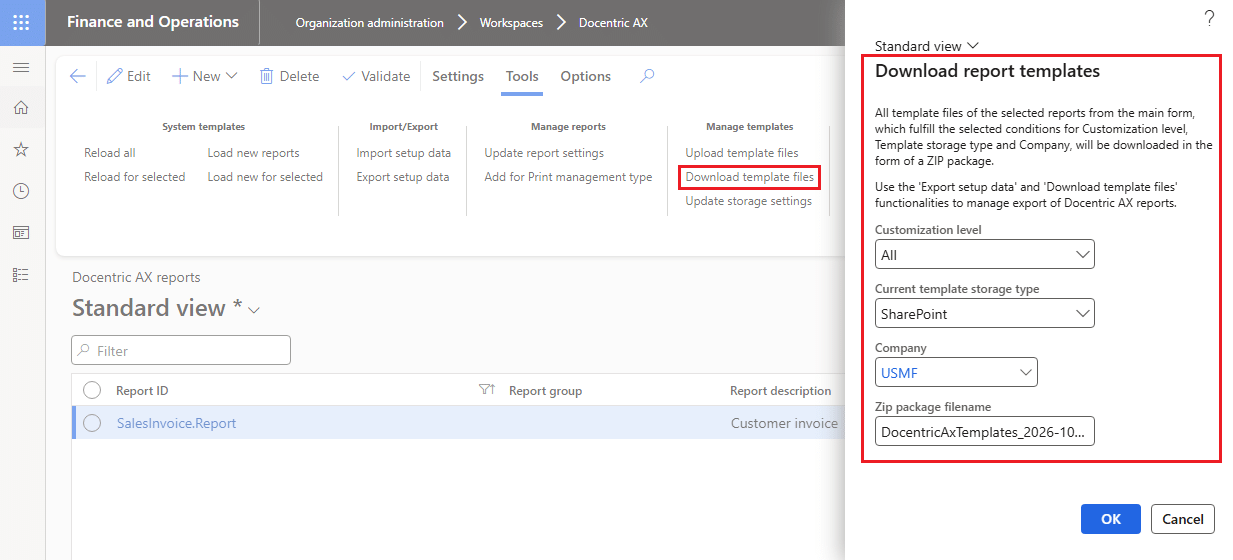
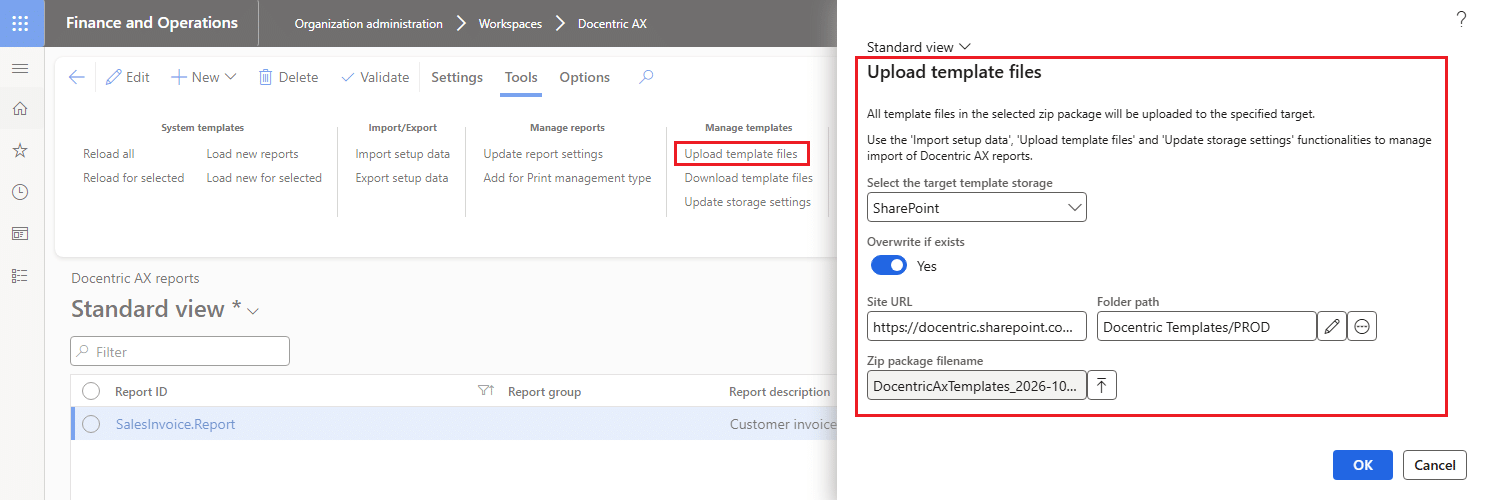
Docentric Deployment Tools are designed move Customized System and Custom Templates as well as other settings from Docentric report setup between environments.
They support:
- Download/Upload templates
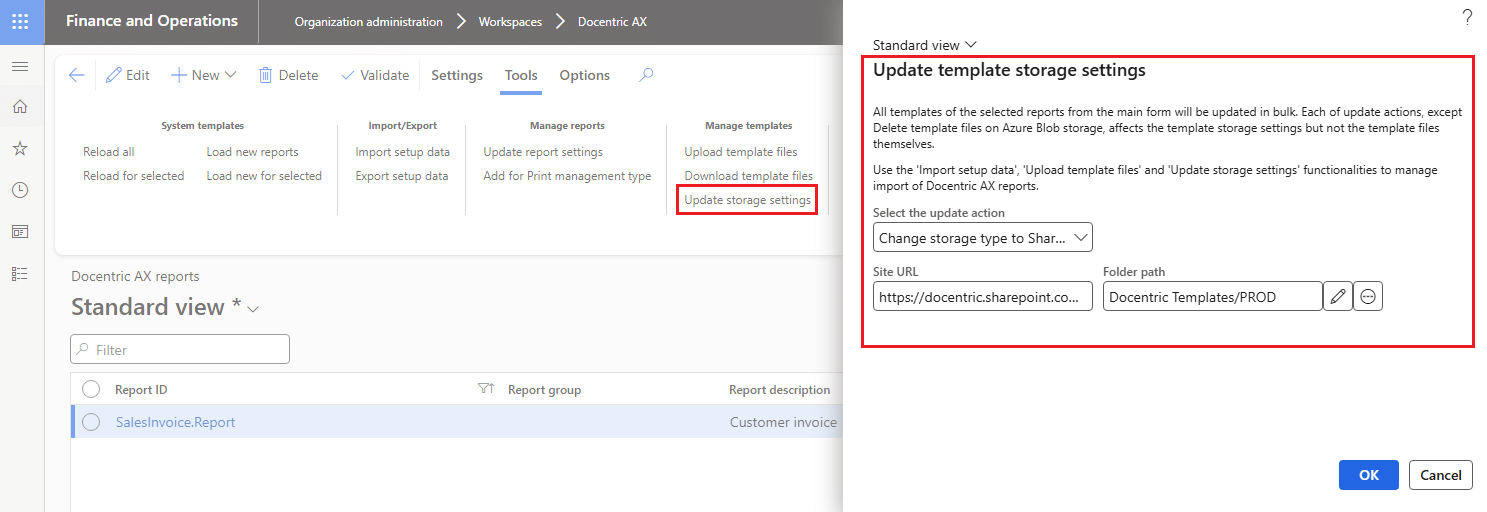
- Update storage settings
- Export/Import report setup data
For example, templates from multiple reports can be downloaded together as a ZIP package. That downloaded ZIP package can then be uploaded to the corresponding storage in another environment.
If TEST/UAT and PROD use different SharePoint folders, Azure Blob Storage locations or other storage settings, Update storage settings can be used to update these settings in bulk.
Alternative: Copy template files directly
Customized System Templates and Custom Templates stored outside AOT can also be moved between environments by copying the template files directly:
- For templates stored in File System, the files can be copied using standard file-copy tools such as xcopy.
- For templates stored in SharePoint, the files can be copied between the corresponding document libraries or folders using SharePoint file management.
- For templates stored in internal D365FO Azure Blob Storage, direct copying between environments is no longer available. Microsoft has restricted external access to the internal Azure storage used by D365FO, including access through Azure Storage Explorer. Learn more >>
Move also Docentric Report Setup
When moving a template between environments, in addition to the template file, you also need to move the corresponding Docentric report setup.
Docentric report setup contains the configuration required by the report, such as:
- report and design information,
- DSP class,
- templates and their settings,
- Custom Labels,
- and other report-specific configuration.
- Use Export/Import report setup data for moving Docentric report setup between environments.
- Other Docentric configuration can be moved using the corresponding Docentric Data Entities when applicable.
- For the complete procedure for moving between environments, see Docentric Deployment Tools.
Keep Approval and Deployment to Production separate
An approved template is a template that is ready for Production. Approval does not by itself mean that the template has been deployed to Production.
Test → Review → Approve → Move to PROD → Verify in PROD
After the template and related configuration have been moved, perform a final verification in Production to confirm that the expected template, storage location and report setup are being used.
8. Choose the model that fits the customer
There is no single Template Governance model that fits every customer.
In practice, most customers will use one of these three models, or a variation of them.
Development-Controlled model
Use this model when templates should be managed like other application artifacts and changes should go through the normal development and deployment process.
System Template / AOT Resource
↓
Git/Azure DevOps
↓
Build and deploy
↓
TEST/UAT
↓
PROD
↓
Reload System Templates
In this model:
- templates are stored as AOT Resources,
- Git/Azure DevOps provides version history and rollback,
- template changes are reviewed and deployed together with other application changes,
- developers or the implementation partner typically maintain the templates,
- direct template changes in Production are avoided.
This is also the natural model for the original System Templates delivered with Docentric SSRS Replicas.
Business-Managed model
Use this model when Functional Consultants or trained business users should be able to maintain templates without an application build and deployment.
SharePoint is a natural storage choice when the customer also needs versioning and approval.
Custom Template
↓
SharePoint
↓
Draft → Review → Test → Business Review/UAT → Approve
↓
Move approved version to PROD
↓
Verify in PROD
In this model:
- Functional Consultants or trained business users maintain the templates,
- SharePoint keeps the version history,
- SharePoint permissions control access to the template documents,
- a SharePoint approval process can be used when formal approval is required,
- Docentric security controls what users can do with templates in D365FO,
- Template Data Security can further restrict which templates they can maintain,
- approved templates can be moved between environments using the process described in the previous chapter.
This model separates template changes from the application deployment lifecycle while still keeping them controlled.
Combined model
Many customers will use both approaches.
For example, a customer can start with a System Template delivered with a Docentric SSRS Replica and keep the original template in AOT, while maintaining its customer-specific version outside AOT.
Docentric Replica
↓
System Template / AOT Resource
↓
Customer customization
↓
Customized System Template / SharePoint
↓
Draft → Review → Test → Business Review/UAT → Approve
↓
Move approved version to PROD
↓
Verify in PROD
In this model:
- Git/Azure DevOps controls System Templates and other development artifacts.
- SharePoint controls versions and approvals of customer-maintained templates.
- Developers maintain X++ and DSP extensions.
- Functional Consultants / ER specialists can maintain ER-based data sources.
- Functional Consultants and trained business users can design and maintain Word or Excel templates.
- Docentric security roles control what users can do in D365FO.
- Template Data Security controls which templates they can work with.
- Docentric Deployment Tools help move templates and related report setup between environments.
This model is useful when technical changes should remain under normal ALM control, while customer-specific template changes should be maintained independently.
The model can differ between reports
A customer does not need to use the same governance model for every report.
For example:
- a heavily customized invoice with X++ extensions can remain development-controlled,
- a Purchase Order maintained by the customer's Functional Consultant can use SharePoint,
- a simple customer-specific template that does not require formal approval can use Azure Blob Storage.
The important point is to define the model per report or group of reports and use it consistently.
Who maintains the data → Who maintains the template → Where the template is stored → How it is versioned → Who approves it → How it is promoted to PROD → How it can be rolled back
9. Keep Document Branding separate
Template Governance defines who can change a template, where it is stored, how it is versioned and approved, and how it is promoted to Production.
Document Branding solves a different problem: how to keep common information and visual elements consistent across many business documents.
For example, Sales Invoices, Purchase Orders, Quotations and other documents may share:
- company logos,
- headers and footers,
- company addresses and contact information,
- legal information,
- fonts, colors and other visual elements.
Without a common branding approach, the same information may be repeated in many Word or Excel templates. A simple branding change can then require changing many templates separately.
Document Branding can be used to manage common branding information centrally and make it available to Docentric templates.
- Template Governance: controls the lifecycle of individual templates
- Document Branding: keeps common branding consistent across templates
Define the Document Branding approach during Stage 2 of the Implementation Methodology, together with the overall template strategy, and then use it consistently when designing templates.
For the complete setup and available branding options, see Document Branding.
10. Recommended starting point
Define Template Governance before creating a large number of templates.
For each report, or group of reports that will use the same approach, answer the following questions:
- Who owns the data source?
Who will maintain X++/DSP or ER-based data changes during implementation and after Go-Live? - Who owns the template?
Who will design, review and maintain the Word or Excel template after Go-Live? - What type of template will be used?
Will it be a System Template, Customized System Template or Custom Template? - Where will the template be stored?
AOT Resource, SharePoint, Azure Blob Storage or File System? - How will the template be versioned?
Git/Azure DevOps, SharePoint version history or another customer-defined process? - Who can change the template?
Which users need the Docentric AX Template Editor, Power User or Administrator role? Should Template Data Security restrict access to particular templates or legal entities? - How will template changes be reviewed and approved?
Is a simple review enough, or should SharePoint approval be used? - How will the template be tested before Production?
Define the required tests and use the Pre-Go-Live Template Checklist as the minimum quality gate. - How will an approved template be promoted to Production?
Through the normal AOT deployment process or by moving externally stored templates and related Docentric report setup between environments? - How will you roll back an incorrect Production change?
Make sure the previous approved version can be identified and restored. - Can templates be changed directly in Production?
If yes, define who is allowed to do this and how the change will be documented, tested and versioned. - Does the report use common Document Branding?
Decide which information and visual elements should be maintained centrally instead of repeated in individual templates.
Document these decisions together with the Template strategy defined in Stage 2 of the Implementation Methodology.
See also
Docentric Implementation Guide >>
Docentric Implementation Methodology >>
How to Set Up Report Templates >>
SharePoint Template Storage >>
How to Use Deployment Tools >>
Docentric AX Security >>
Docentric SSRS Replicas >>
Docentric CBD Data Replicas >>
Document Branding >>
IN THIS ARTICLE
- 1. Decide who owns the data and who owns the template
- 2. Understand Docentric template types and storage
- 3. Versioning depends on template storage
- 4. Use SharePoint for template versioning and approval
- 5. Control who can change templates
- 6. Pre-Go-Live template checklist
- 7. Move approved templates between environments
- 8. Choose the model that fits the customer
- 9. Keep Document Branding separate
- 10. Recommended starting point
- See also