Implementation Guide
What this guide is
This guide explains how to implement Docentric AX in a Dynamics 365 Finance & Operations (D365FO) project in a structured, repeatable way, from the first install through to go-live and hand-over.
It is written primarily for implementation partners who are adding Docentric AX to their standard D365FO delivery and want a consistent, best-practice approach they can reuse on every project. It is equally useful to customers implementing Docentric AX directly, and to any D365FO professional evaluating how Docentric fits their reporting and document output needs.
You don't need prior hands-on Docentric experience to follow it. Wherever a step benefits from deeper material, we link to the relevant how-to manual, video tutorial, or training.
How this guide is organized
This guide is organized into a top-level overview (this page) and these sub-pages:
1. Before you start: Prerequisites and environment/version compatibility, the roles involved in a Docentric implementation, and the key terms glossary.
Start here if you want the groundwork and vocabulary first >>
2. Enablement, demo environment & training: A recommended learning order for teams new to Docentric, how to build an internal demo and training environment, and the recommended materials and training for both functional and technical consultants.
Start here if your first goal is getting your own team ready >>
3. Implementation methodology: The end-to-end delivery approach in five stages: Set up, Analyze & decide, Build & prove, Distribution, and Test / release / hand-over.
Start here when you are implementing on a real project >>
How Docentric AX fits the D365FO reporting pipeline
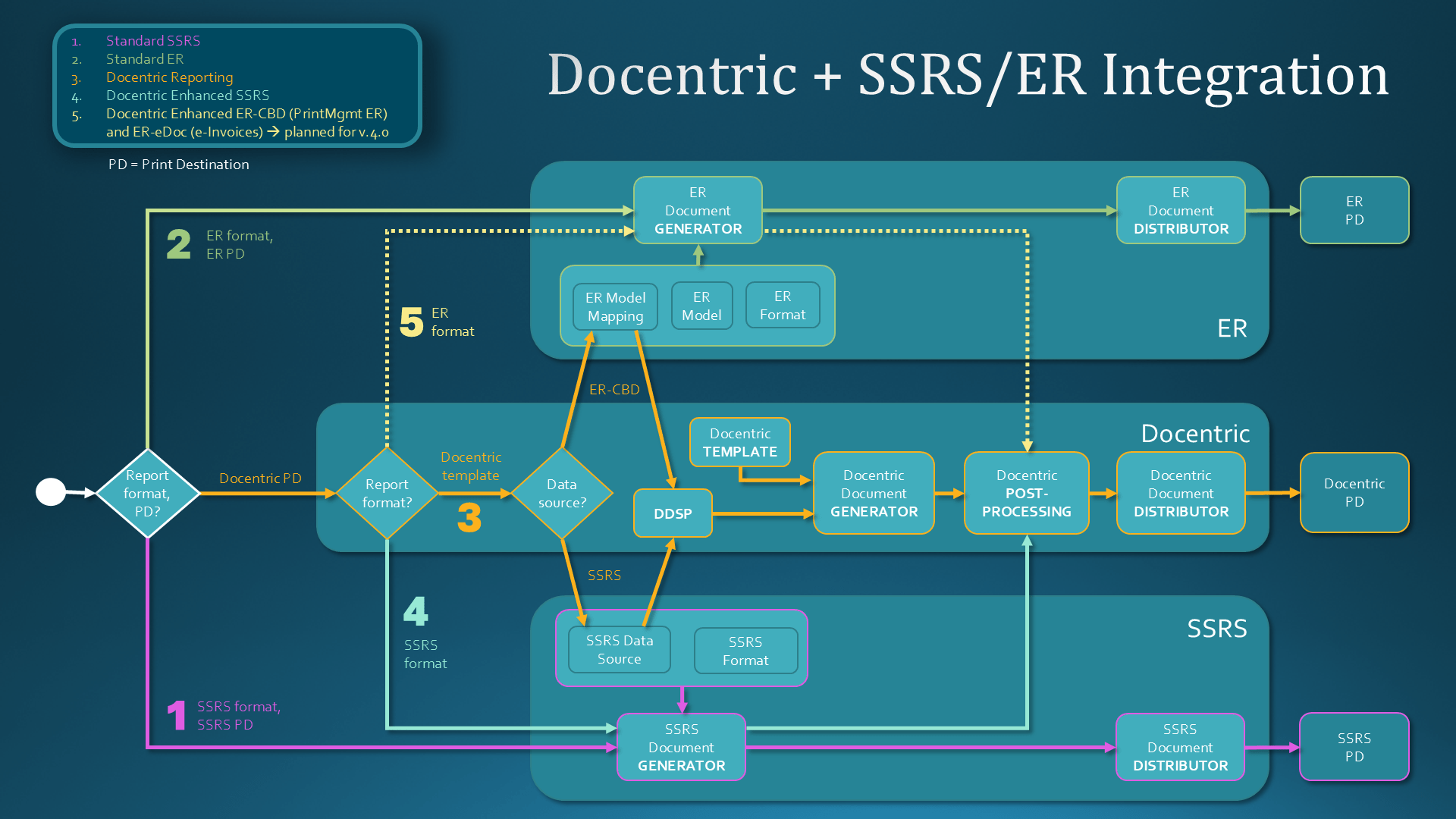
Standard D365FO produces business documents, such as invoices, order confirmations, packing slips, statements, and so on, in two main ways:
- SSRS reports: Report Data Provider (RDP) prepares the report data source, which is combined with an SSRS layout (form) to generate the output document.
- ER-based business documents: Electronic Reporting (ER)-based framework starts from the same SSRS/RDP data source, enriches it through an ER model- and model mapping configuration, and combines it with an ER format. The solution was originally branded Configurable Business Documents (CBD) and in our documentation we refer to them as CBD or ER-CBD.
Docentric AX does not replace these pipelines. It layers on top of them, preserving standard D365FO behavior such as posting and frameworks like Print management. It takes over the prepared data source and adds elements that standard D365FO does not provide:
- A Microsoft Word–based template for the layout, designed and maintained in the Docentric AX Designer instead of in SSRS or ER – see Docentric TEMPLATE element in the image below.
- A Data Source Provider (DSP) class, where developers can shape the data in X++, add custom placeholders, and override how the document is generated and distributed. It produces the final data source – see DDSP (Docentric Data Source Package) element in the image below.
- Additional document processing options, such as encryption, electronic signing, PDF/A support, etc. – see Docentric POST-PROCESSING below.
- Rich document distribution options, available through Docentric improved print destinations – see Docentric Document DISTRIBUTOR and Docentric PD (Print Destination) below.
For most frequently used reports, Docentric ships a ready-made replica as a starting point:
- A Docentric SSRS replica for SSRS-based reports: Docentric MS Word-based template, producing the same printout as the related SSRS format, comes together with the report-specific DSP class.
- A Docentric CBD replica for ER-CBD-based reports: Docentric MS Word-based template, producing the same printout as the related ER format, comes together with an extension of the related SSRS replica’s DSP class.
Recommended approach
We recommend introducing Docentric early in the implementation, ideally during the Analyze and decide stage for business documents and reporting, alongside the related business processes.
Document requirements like these are best collected and designed together with the related business process, rather than "patched in" later. This is consistent with Microsoft's own implementation guidance, which brings ISV solutions into the early Solution Blueprint build stage rather than treating them as a late add-on.
Start here: your first hour
If you have never touched Docentric, the fastest way to build confidence is to prove the full loop once in your own development or sandbox environment. You can do this before reading any further:
- Install the core models: Docentric AX, Docentric AX Extension, Docentric AX Emails, and the Docentric AX SSRS Replicas model.
- Apply your license. No license yet? Write to sales@docentric.com to request a short demo and evaluation license for Docentric AX Full Edition, or keep using the Free Edition features.
- Load the system templates: open the Docentric AX Workspace and click the Reports tile, then confirm the prompt to load all system templates. This registers a large set of standard SSRS report & format combinations (around 80 at the time of writing), each with its matching Docentric replica template.
- Preview a Purchase order (PO) confirmation using Preview/Print > Original preview. It automatically uses the Docentric replica template.
- Make a simple template modification: download that PO confirmation template, make some small change in design using standard Word features (for example, a title color), re-apply it, and preview again.
- Install the Docentric AX Designer: a new, Docentric ribbon tab appears in your MS Word.
- Use the Docentric AX Designer: on the same PO confirmation template make some small data-related change using Docentric tagging elements (for example, add one Field tagging element and bind it to any field from the Purchase order header), re-apply it, and preview again.
That is the entire template loop: install, register, preview, modify, re-preview – proven on a single report. Full step-by-step detail is in the Implementation methodology.
Common pitfalls to avoid
The mistakes we most often see from teams new to Docentric:
- Waiting until UAT to start on public-facing documents. Start during Solution Blueprint build stage.
- Starting with the hardest report. Prove the pattern on Purchase order confirmation first, not Sales invoice.
- Converting many reports in parallel. Implement one report end-to-end, document the pattern, then repeat it.
- Over-engineering templates. Start from a replica and keep the layout simple and maintainable.
- Leaving Print management and distribution to the later stages of the project. Capture output and distribution requirements early, keep Print management settings simple, and avoid unnecessary overrides.
- (Partners) Using your partner license in a customer environment. Customer environments must use the customer license.
See also
Implementation Guide: Before You Start >>
Implementation Guide: Enablement, Demo Environment and Training >>
Implementation Guide: Implementation Methodology >>
Implementation Guide: Template Governance >>
Implementation Guide: Document Branding >>
Business Documents in Dynamics 365 Business Process Catalog >>