
 Tags:
Tags: 
Printing multiple invoices in Dynamics 365 Finance and Operations (D365FO) just got easier!
Whether you need to reprint a few invoices or send hundreds to a different print destination, you can now do it directly from the Invoice journal form interactively or in batch.
The Print invoices in bulk and batch feature was introduced in Docentric AX version 3.5.0 Free Edition and supports these invoice journal forms and invoice types:
- Customer invoice journal - CustInvoiceJournal - supports Customer invoices and Free text invoices
- Open customer invoices - CustOpenInvoicesListPage (available from Docentric AX version 3.5.1)
- Project invoices - ProjInvoiceListPage - supports all types of Project invoices
In this article, we’ll walk through how to print in bulk and batch using the Print selected and Print range options, with or without using Print management.
Printing in bulk and batch
For this example, we’ll use the Project invoices, which you can access in Project management and accounting > Project invoices > Project invoices.
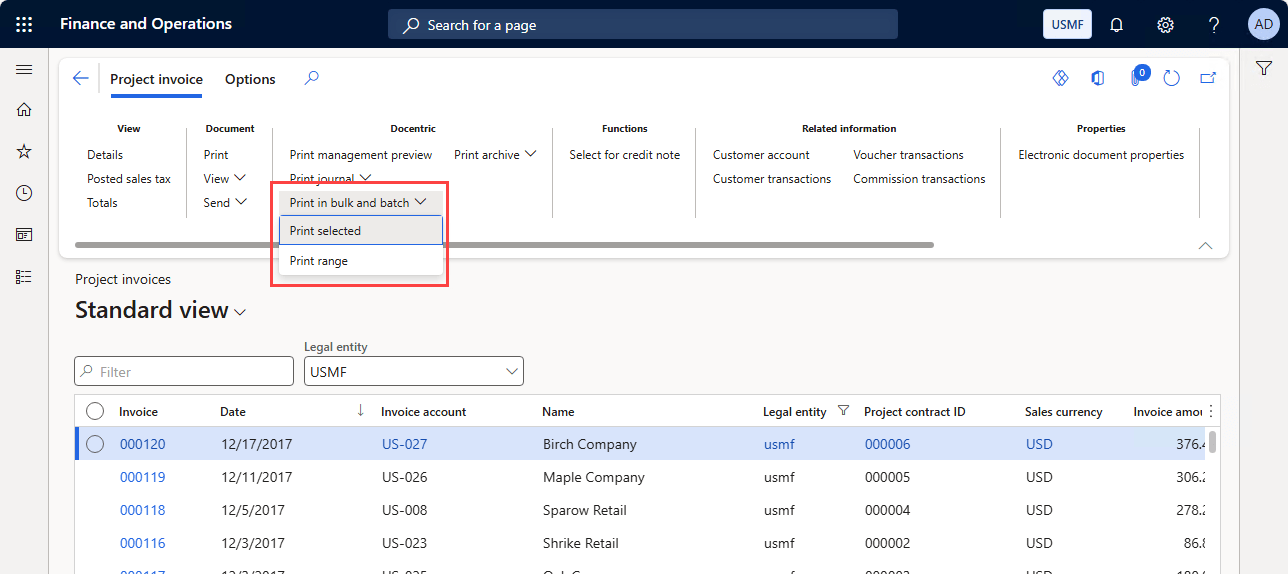
On the Docentric menu in the Project invoice tab, click the Print in bulk and batch button.
You will see two options:
- Print selected: prints only the records you select in the grid.
- Print range: prints reports based on a query.
Let’s go through both.
Print selected
Use Print selected when you want to print a few specific invoices directly from the journal grid.
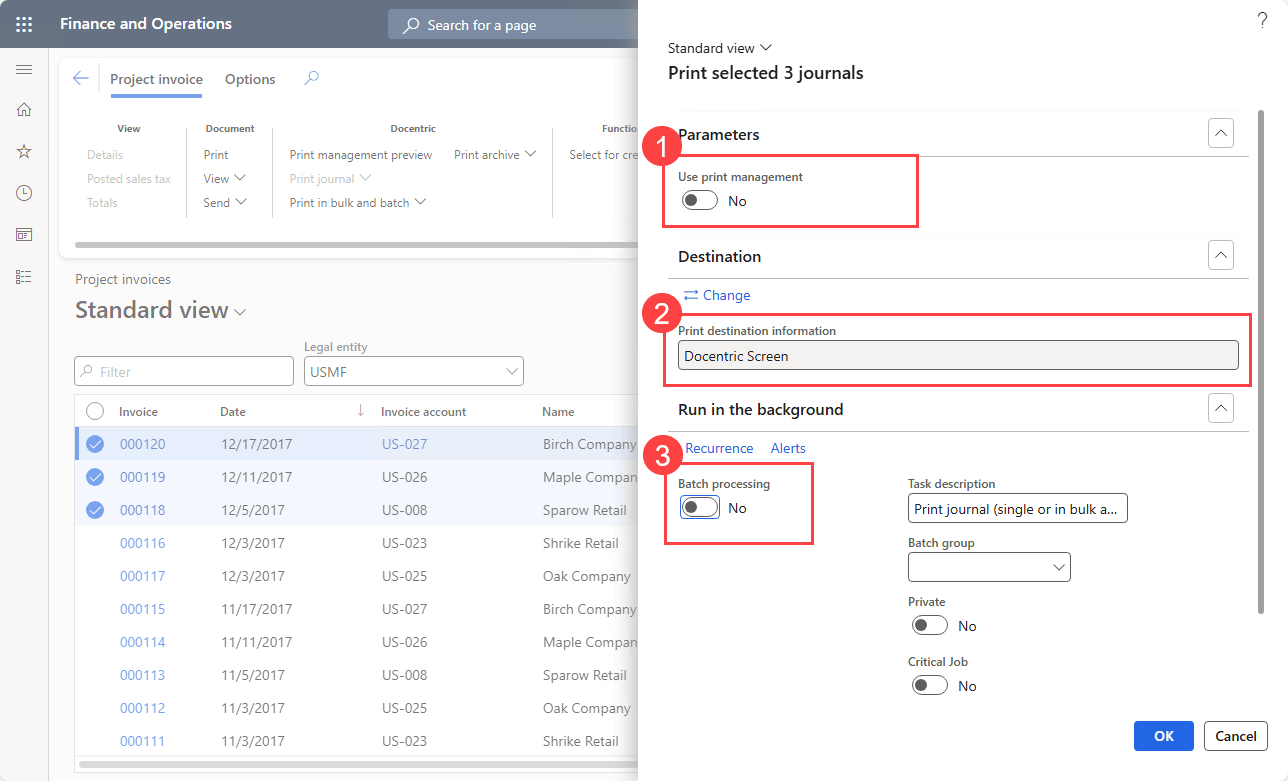
In the dialog, you will find the following options:
- Use print management: runs reports using your existing Print management setup.
- Print destination: prints reports to an ad-hoc print destination of your choosing (Screen, Email, SFTP, Azure Blob storage, Azure Files, SharePoint etc.).
- Run in batch: enables you to print asynchronously, ideal when printing many reports.
Print range
When you need to print many reports, selecting them one by one can be tedious.
The Print range option allows you to easily build a query to define which records to print. You can add joins, filters and other conditions to match your needs.
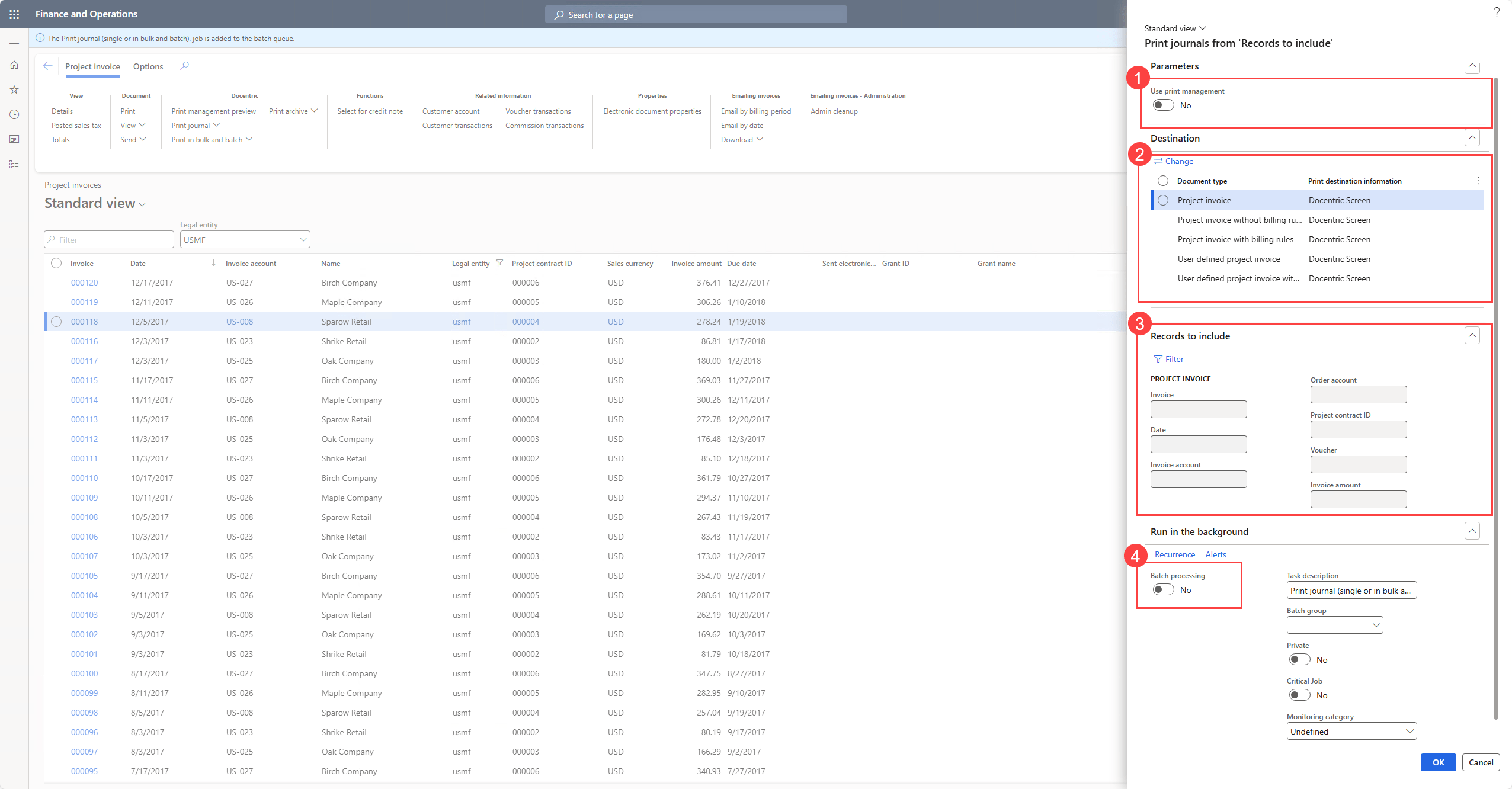
The Print range dialog includes:
- Use print management: same as in Print selected, used to print using the Print management settings.
- Print destination: allows you to configure Print destination settings per Print management document type (per different invoice type).
- Records to include: the query that is used to filter the invoices to print.
- Run in batch: same as in the Print selected option, use it if you plan to print a large number of reports or to print reports on a schedule by utilizing the Records to include query.
To choose which invoices are printed, you will need to configure the Records to include query.
Summary
The new Print in bulk and batch functionality makes it simple to print multiple invoices directly from Customer and Project invoice journals in D365FO.
Use Print selected for quick reprints of chosen invoices, and Print range when you need to print large sets of invoices defined by a flexible query.
Combined with Docentric print destinations and batch processing, you can now schedule, distribute, and manage invoice printing more efficiently.
Download Docentric Free Edition now and start printing smarter!
Would be great to add this on the Customer Open Invoices screen! Granted, I know there’s other ways to address – by sending open invoices with statement, but would offer greater flexibility. Otherwise, it requires an additional step to filter out only open ones.
Looking forward to all journals!
Hello Jake,
I’m happy to say that, starting with Docentric v3.5.1, we now support the Open customer invoices form for printing in bulk and batch and also for printing without print management!
It would be ideal if there was an option to merge PDFs or save as one PDF. I was hopeful that this did this already. I’m sure it’s on the roadmap.
Hello Jake,
Thank you very much for the suggestion!
We haven’t yet decided if it’s going to be part of the next release or the one after, but rest assured this feature is on our internal roadmap.
We would be very grateful if you could contact us on our support email (support@docentric.com) and tell us in more detail about your use case and the print destination you would like to use with this merged PDF, so that we can make the feature better.
Hi,
Is it possible to print multiple invoice in one document format like a one-pager? Our client has Doccentric and wants a consolidated invoice.
Thanks
Hi Arslan,
The bulk printing feature does not merge invoices into a single document.
If your client’s main goal is just to send multiple invoices together, you can try the DEMI (Docentric Emailing Multiple Invoices) feature:
https://ax.docentric.com/docentric-emailing-multiple-invoices/
You can use this as a PoC (Proof of Concept) to merge several invoices into a single PDF and email it.
Hi,
is the print management query here applied, when bulk/batch printing, or is the default used?
BR
Hi Aleksandra,
Yes, that’s correct! Conditional Print Management settings are applied when printing is executed through Print Management, i.e. when the Use Print Management flag is set to Yes.