
 Tags: Batch, D365FO, X++
I have always thought that the code always knows if it is running in batch job and can get the batch job context. But it has turned out that it is not so clear 😉.
While troubleshooting some problem we have found out that the standard runAsync() method is executed in another session (using another thread). If it is called from code running in a batch job, the standard batch API cannot find the right batch info based on the session ID. Therefore, the code does not know the batch context, but it is aware that it runs in batch.
In this article we will explain how runAsync() works, how to run operations in parallel, wait for them to finish, and collect the results. Our use case will be parallel document report generation resulting in one ZIP file. We will show also technical details and tricks for using it in interactive session or in batch job.
runAsync()
The global method runAsyn() can be used to run any static method in parallel session (running in separate thread). In X++, this means a separate session ID, transaction scope, and static variables. Therefore, it is usually thread safe, but it is hard to communicate with the caller. If such communication is needed use the database, global cache or .NET static objects.
|
1 2 |
runAsync(classNum(DocExamplePrintAsync), staticMethodStr(DocExamplePrintAsync, doRunAsync), [_sessionId()]); |
Notes:
- Parameters are passed as a container (official documentation is inaccurate), which means they are serialized. If the called method does not accept it, make a wrapper.
- Optionally you can also set userID, company and language.
- It accepts also optional callback parameter where you can handle the method result or exception, but you can achieve the same by adding this code in the called method.
- It returns System.Threading.Tasks.Task that you can wait for or simply ignore and forget it.
Returning result
Async session typically does some processing and stores the results in the database. In our sample we do not need it and use instead global cache (SysGlobalObjectCache). It is a key-value dictionary shared among all sessions on the same AOS (async session is always on the same node as the main session). We pass the main session ID as async method parameter and then it stores the result in global cache using that ID in the key.
Batch jobs
runAsync() can be called from an interactive session or from a batch job. The batch job processor executes each batch task in one of the available batch (worker) sessions. If the batch job code calls runAsync(), it executes the called method in a separate async session, which is not one of the available batch sessions.
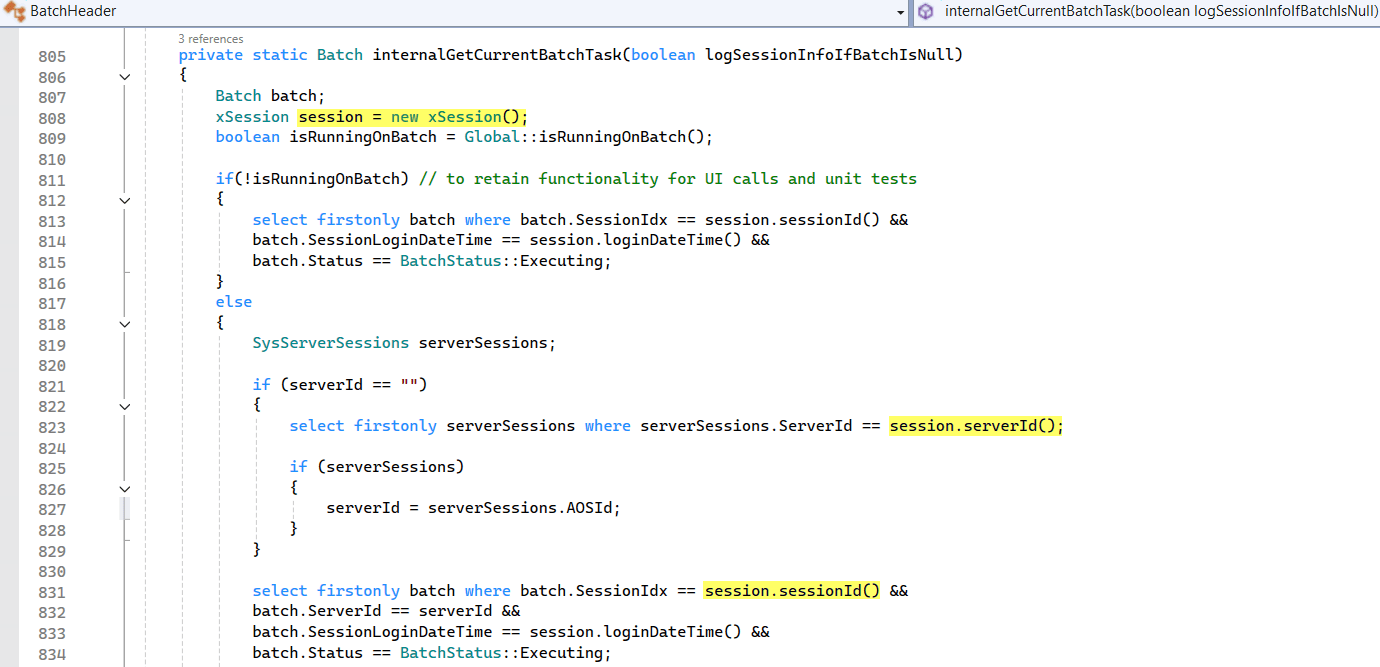
Here comes the catch. The standard batch API (for example, BatchHeader::getCurrentBatchHeader()) looks up current batch info by the current session ID in the Batch and SysServerSessions tables. As the async session has a different session ID, it returns null. There is no way to get the batch info from async session itself, but you can use the workaround passing the caller session ID as async method parameter and use it to get the batch info.
Parallelism
You can use runAsync() to run several operations in parallel. In our sample we generate several documents in parallel, wait for them to complete and then ZIP them in one file. Note that each parallel session runs in additional thread and you should keep the number of all running threads under certain limits. If you exceed the limits the overall system efficiency will first decrease, then the system might block or even crash.
As on D365FO cloud environments we do not know infrastructure details the general rule is 8 threads/AOS, but you can test with slightly higher number as long as it improves the results.
Note that the total number of running threads includes also other threads on interactive or batch AOS. For batch jobs it is usually better to use runtime batch tasks where execution is controlled by batch processing.
Sample code
|
1 2 3 4 5 6 7 8 9 10 11 12 13 14 15 16 17 18 19 20 21 22 23 24 25 26 27 28 29 30 31 32 33 34 35 36 37 38 39 40 41 42 43 44 45 46 47 48 49 50 51 52 53 54 55 56 57 58 59 60 61 62 63 64 65 66 67 68 69 70 71 72 73 74 75 76 77 78 79 80 81 82 83 84 85 86 87 88 89 90 91 92 93 94 95 96 97 98 99 100 101 102 103 104 105 106 107 108 109 110 111 112 113 114 115 116 117 118 119 120 121 122 123 124 125 126 127 128 129 130 131 132 133 134 135 136 137 138 139 140 141 142 143 144 145 146 147 148 |
// Sample code for running report with runAsync() and send it to the user when it's done // Result is passed using SysGlobalObjectCache with caller sessionID as the key, because asyn mehod and its callback run in another session (not in main one). // Printouts from main session are shown in infolog while others are shown in action center. class DocExamplePrintAsync extends RunBaseBatch { static SysGlobalObjectCache sgoc = new SysGlobalObjectCache(); static GlobalObjectCacheScope scope = classStr(DocExamplePrintAsync); // Runs in main session public void run() { int sessionId = sessionId(); info (strFmt("Main thread started. sessionId=%1", sessionId())); const int parallelThreads = 3; System.Threading.Tasks.Task[] tasks = new System.Threading.Tasks.Task[parallelThreads](); CustInvoiceJour custInvoiceJour; select custInvoiceJour where custInvoiceJour.SalesId != ''; for (int i=1; i<=parallelThreads && custInvoiceJour.RecId; i++) { // Run async doRunAsync([sessionId(), i, custInvoiceJour]) System.Threading.Tasks.Task task; task = runAsync(classNum(DocExamplePrintAsync), staticMethodStr(DocExamplePrintAsync, doRunAsync), [sessionId, i, custInvoiceJour.data()] ///,System.Threading.CancellationToken::None, classNum(DocExamplePrintAsync), staticMethodStr(DocExamplePrintAsync, processAsyncDataExecutionResult) // calback is optional ); tasks.SetValue(task, i); next custInvoiceJour; } // Wait that all tasks finish or poll the results from cache. In real life scenario you can do some other work in main thread instead of waiting. System.Threading.Tasks.Task::WaitAll(tasks) ; // Get results from cache and send ZIP file to user (if running in interactive session) List documents = new List(Types::Container); for (int i=1; i<=parallelThreads; i++) { container generatedReport = sgoc.find(scope, [sessionId, i]); if (generatedReport) { System.IO.MemoryStream reportMemoryStream = DocGlobalHelper::convertContainerToMemoryStream(generatedReport); info(strFmt("Document %1 generatedReport %2 bytes.", i, reportMemoryStream.Length)); documents.addEnd([strFmt('Invoice %1.pdf', i), reportMemoryStream]); } sgoc.remove(scope, [sessionId, i]); } System.IO.Stream zip = DocDocumentHelper::documents2Zip(documents); if (!isRunningOnBatch()) DocFileMngHelper::sendFileToUser(zip,"SalesInvoices.zip"); } // Runs in async session. _parameters = [caller session ID, document sequence number, journal record] public static container doRunAsync(container _parameters) { info (strFmt("doRunAsync sessionId=%1", sessionId())); info(strFmt("Async process started. isRunningOnBatch=%1 isRunningMode=%2", isRunningOnBatch(), isRunningMode())); if (isRunningOnBatch() && BatchHeader::getCurrentBatchHeader()) { info(strFmt("BatchHeaderId=%1", BatchHeader::getCurrentBatchHeader().parmBatchHeaderId())); } // Unpack parameters int sessionId, i; CustInvoiceJour custInvoiceJour; [sessionId, i, custInvoiceJour] = _parameters; // Generate report and save it to container container generatedReport = DocSendSalesInvoicePostedBusinessEvent::printSalesInvoiceReportToContainer(custInvoiceJour, false); // Return result to caller session using SysGlobalObjectCache (here or in the callback) sgoc.insert(scope, [sessionId, i], generatedReport); info("Async process completed."); return [sessionId, i, generatedReport]; } // Runs in async session (same as doRunAsync method) OPTIONAL public static void processAsyncDataExecutionResult(AsyncTaskResult taskResult) { container returnValue; System.Exception exception; info (strFmt("processAsyncDataExecutionResult sessionId=%1", sessionId())); if (taskResult != null) { // Return value from async method returnValue = taskResult.getResult(); // Exception thrown by async method invocation. exception = taskResult.getException(); if (ClrInterop::isNull(exception)) { int sessionId, i; container generatedReport; [sessionId, i, generatedReport] = returnValue; info(strFmt("result: %1", conLen(returnValue))); sgoc.insert(scope, [sessionId, i], generatedReport); } else { error(exception.Message); } } } public static void main(Args _args) { DocExamplePrintAsync instance = new DocExamplePrintAsync(); if (instance.prompt()) { instance.runOperation(); } } static ClassDescription description() { return classStr(DocExamplePrintAsync) + " tutorial"; } public boolean runsImpersonated() { return true; } protected boolean canRunInNewSession() { return false; } } |
Summary
The article explains how runAsync() works and the specifics that you need to handle. The sample code demonstrates parallel document report generation in multiple async sessions, waiting for their completion and using the result. It shows the use of global object cache for inter-session communication and is designed to run both in batch job or interactively.