
The Feature
If you check out the Docentric AX Parameters page on a UAT or DEV environment, you may notice that the Suppress outgoing emails parameter is set to the Suppress with download value:

The code responsible for this is located in the environmentChanged() method of the DocStartupManager class:

This code is executed if it detects that the environment name has changed.
The environment name is changed; for example, when a PROD database is imported into a UAT environment for testing with real data.
The Suppress outgoing emails feature serves as a safeguard that prevents sending unintended emails to real clients. Some other preventive actions like Suppress document routing and clearing encrypted fields are also executed.
Testing With Real Data
Of course, sometimes it is necessary to use the real data and actually send out emails from UAT for testing purposes.
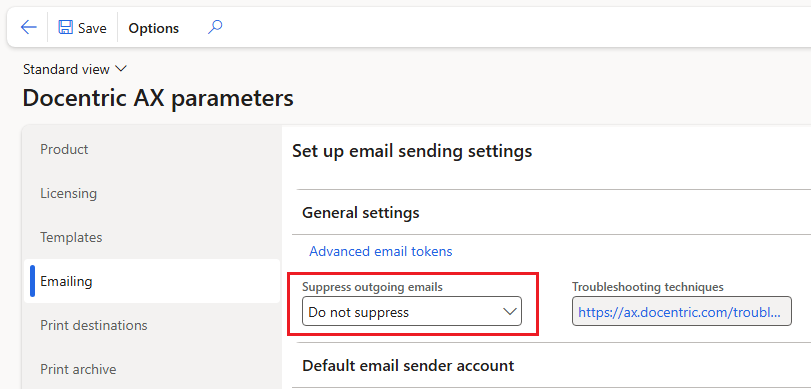
In such cases, you can simply set the Suppress outgoing emails parameter to Do not suppress:
Unexpected environment change detections
Some customers have reported that sometimes Suppress outgoing emails parameter keeps resetting back to Suppress with download. That is a known issue when a developer connects DEV onebox environment to the database of running LCS Sandbox environment as described here. In this case you have two environments using the same database. When each environment is started it compares the environment hostname from the database and from web configuration. If it differs it runs preventive actions and stores new hostname in the database. Because LCS Sandbox has different hostname than DEV in web configuration it can result in hostname oscillation and frequent execution of preventive actions.
Starting with Docentric AX v3.4.8 you can disable environment change detection by following the instructions in the yellow info box at the bottom of this how-to manual.


On DEV environment you need to disable environment change detection by inserting Docentric.DetectEnvironmentChanged in web.config when you connect it to the database of another running environment.
This feature is meant solely for that scenario and do not use it on non-development environments or in other use cases.