
Introduction
With the Docentric report generator, it’s possible to print reports to a memory stream in x++ by using the DocSrsReportGenerator class.
The generated memory stream can then be used further, for example it can be sent to the browser directly for the user to download, as can be seen in the example below for the SalesPackingSlip.Report report or in this other example for the FreeTextInvoice.Report:
Limitations
The first limitation of the DocSrsReportGenerator class is that it cannot be used in proforma scenarios, for those, please check out this article about how to print the SalesInvoice.Report Proforma as a Byte Array:
The DocSrsReportGenerator has some different limitations depending on the way that certain print management reports are implemented.
In D365FO, there are two main ways to implement print management reports:
- via the PrintManagementReportRun approach - by implementing the base class SrsPrintMgmtController
- via the FormLetter approach - by implementing the base class PrintMgmtFormLetterController
PrintManagementReportRun approach
If the PrintManagementReportRun approach is used, then using the DocSrsReportGenerator may be limited due to the way the print management settings are set in the runPrintMgmt() method of the controller class.
An example of this is the WHSLoadListController class.
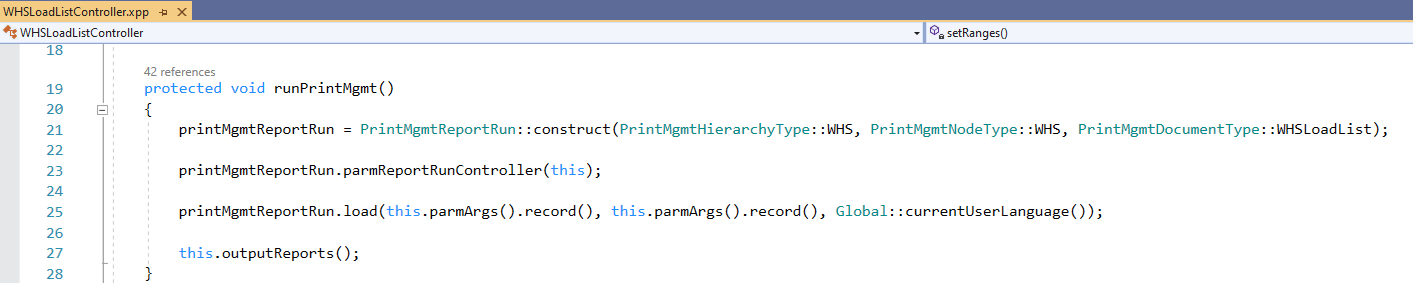
In this case, there are two possible ways to extend the method runPrintMgmt() and modify the printMgmtReportRun object, but neither will work:
- We can do it before the report is executed on line 27, but those changes will be lost, since the variable is reinitialized on line 21.
- We can do it after the report is executed on line 27, but by then it’s meaningless, because the report is already printed.
FormLetter approach
If the FormLetter approach is used, then using the DocSrsReportGenerator may be limited depending on the specific implementation.
For example, if the report implements the FormLetterJournalPrint class, the following properties should be available:
- parmPrintFormLetter
- parmUsePrintManagement
- parmUseUserDefinedDestinations (optional)
- parmPrinterSettingsFormLetter
- parmPrinterSettingsFormLetterCopy
When the report is run with the DocSrsReportGenerator, the properties should be set to the following values, otherwise the report may instead be printed to the wrong print destination:
- printFormLetter = true
- usePrintManagement = false
- useUserDefinedDestinations = true
- printerSettingsFormLetter = reportGenerator.getPrintDestinationSettings().pack()
- printerSettingsFormLetterCopy = reportGenerator.getPrintDestinationSettings().pack()
We also need to pass a specific value for the PrintCopyOriginal enum value to the controller of the report.
If the useUserDefinedDestinations parameter is implemented, we must set the value of the PrintCopyOriginal enum to:
- PrintCopyOriginal::Original - in this case only the printerSettingsFormLetter property must be set.
- PrintCopyOriginal::Copy - in this case only the printerSettingsFormLetterCopy property must be set.
An example of this kind of report is the FreeTextInvoice.Report.
If the useUserDefinedDestinations parameter is NOT implemented, then we must set the value of the PrintCopyOriginal enum to:
- PrintCopyOriginal::OriginalPrint - in this case both properties printerSettingsFormLetter and printerSettingsFormLetterCopy must be set.
This is because ONLY the LAST applicable setting in print management will be used, which can be either Original OR Copy.
An example of this kind of report is the SalesPackingSlip.Report.
Reports that use the FormLetter approach include SalesInvoice, FreeTextInvoice, SalesPackingSlip, SalesQuotation, etc.
Working example code
Below is a working example of how to run the SalesPackingSlip report using the DocSrsReportGenerator:
class DocPrintSalesPackingSlipToBrowser
{
    public static void main(Args _args)
    {
        CustPackingSlipJour custPackingSlipJour;

        select firstonly custPackingSlipJour;

        Args args = new Args();
        args.record(custPackingSlipJour);
        args.parmEnumType(enumNum(PrintCopyOriginal));
        args.parmEnum(PrintCopyOriginal::OriginalPrint);

        SalesPackingSlipController salesPackingSlipController = SalesPackingSlipController::construct();
        salesPackingSlipController.parmReportName(PrintMgmtDocType::construct(PrintMgmtDocumentType::SalesOrderPackingSlip).getDefaultReportFormat());
        salesPackingSlipController.parmArgs(args);

        SalesPackingSlipContract salesPackingSlipContract = salesPackingSlipController.parmReportContract().parmRdpContract();
        salesPackingSlipContract.parmRecordId(custPackingSlipJour.RecId);

        DocSrsReportGenerator reportGenerator = new DocSrsReportGenerator(salesPackingSlipController);
        reportGenerator.setPrintDestinationSettings_DocentricReport(DocOutputFileFormat::PDF, 'SalesPackingSlip.Report');

        SalesPackingSlipJournalPrint salesPackingSlipJournalPrint = SalesPackingSlipJournalPrint::construct();
        salesPackingSlipJournalPrint.parmPrintFormletter(true);
        salesPackingSlipJournalPrint.parmUsePrintManagement(false);
        salesPackingSlipJournalPrint.parmPrinterSettingsFormLetter(reportGenerator.getPrintDestinationSettings().pack());
        salesPackingSlipJournalPrint.parmPrinterSettingsFormLetterCopy(reportGenerator.getPrintDestinationSettings().pack());

        args.caller(salesPackingSlipJournalPrint);

        container generatedPackingSlip = reportGenerator.generateReport();

        using (System.IO.MemoryStream reportMemoryStream = DocGlobalHelper::convertContainerToMemoryStream(generatedPackingSlip))
        {
            DocFileMngHelper::sendFileToUser(reportMemoryStream,"SalesPackingSlip.pdf");
        }
    }
}
Please note that it is necessary to have at least one record in the print management setup for the SalesPackingSlip report, even if you are not using this print management to execute the report:
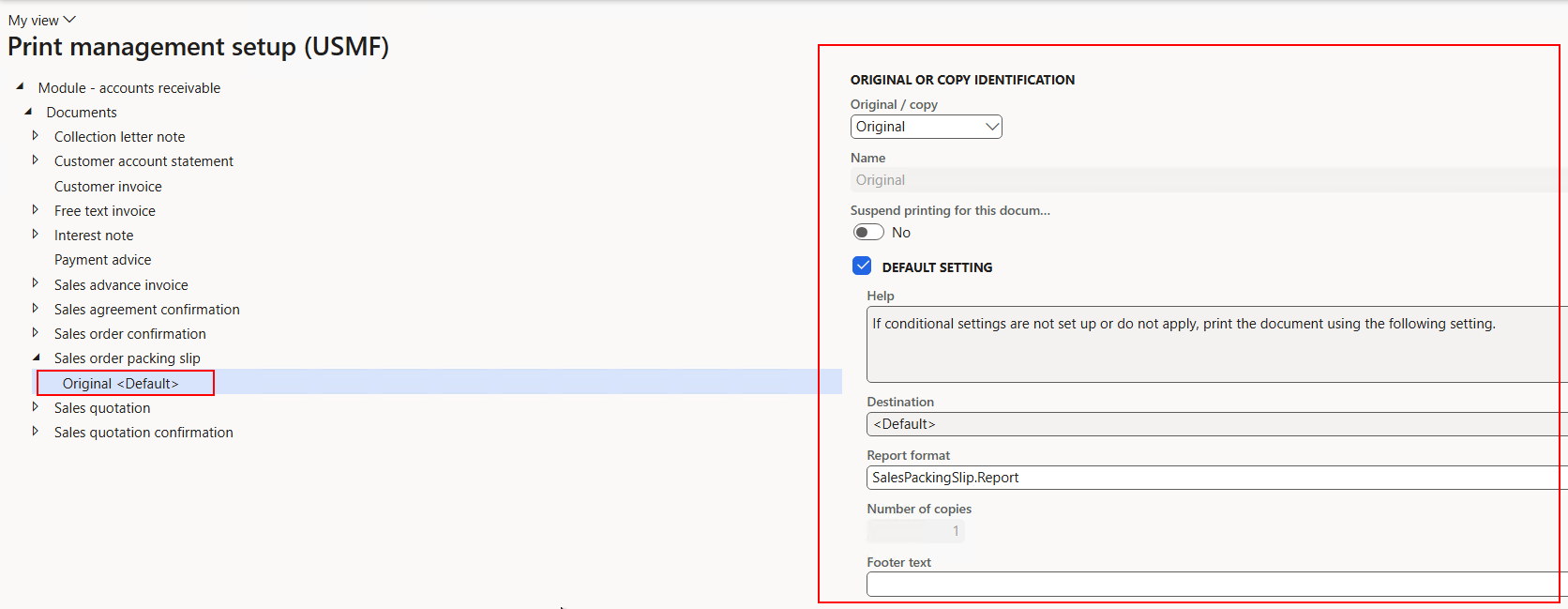
Otherwise, the container generatedPackingSlip will be empty and an error will be displayed:
