Intro
Some problems can’t wait for release notes. This topic serves as a hub for known issues and technical advisories in Docentric AX, so you hear about them before they hit your environment.
Subscribe once, and you’ll get an email notification whenever something new is reported that could affect Docentric users in any way.
Every known issue or advisory will be posted as a reply to this topic, using the following format:
- Headline - stating the problem or change, tagged [Known Issue] or [Advisory]
- Affected Docentric AX versions
- Affected D365FO versions
- Description - what happens and where you’ll see it
- Workaround / Action required - what you can do right now
- Status - current state
We will update the Status line of the original post as things progress. Since edits don’t trigger email notifications, check back on open issues that affect you, or watch our new releases forum topic to catch the released fix.
How to Subscribe to Get Notified
To be able to subscribe, you will first have to create an account on our forum.
We invite you to join our community, which will also enable you to share ideas and get help from both Docentric AX experts and fellow D365FO community members.

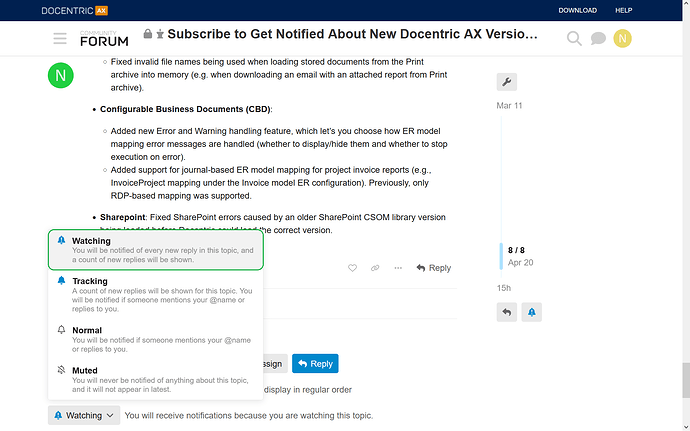
To subscribe to this topic, you need to scroll down, below the last reply at the bottom of this page, click on the bell icon and choose Watching.
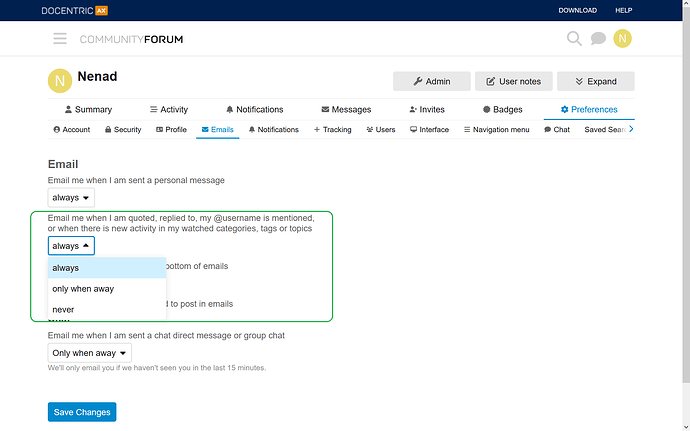
Please note that you need to enable email notifications in your preferences:
How to Report an Issue or Concern
If you find a bug or want to report an issue with Docentric AX, please share it with us by creating a new topic on our forum or by contacting our support (support@docentric.com). Use the same channel also for questions and concerns.