We have turned on and are utilizing the feature “Enable project categories for on-account transactions” allowing us to specify a project category for on-account transactions, especially for fixed price project milestones.
When updating the project invoice template, I’m having trouble getting those categories to show up. The ones for hours, expenses all show, but the on-account ones don’t.
Regarding the On-account Category introduced by the Enable project categories for on-account transactions feature, this data is currently not included in our Docentric report specific DSP class for the Project Invoice report. As a result, the on-account category information is not available in the data source and therefore cannot be directly bound to the report template.
To include this information in your report, we recommend extending the DocPsaProjInvoiceDSP class and adding the required on-account category fields.
You can find more information about extending a Docentric DSP class and adding additional field in the following How-To manual:
Once the additional data has been added to the DSP and is available in the DDSP file, you will be able to apply changes to your report template and bound the new fields.
After further investigation of the issue and the feature behavior, we identified that the root cause is related to the Microsoft PSAProjInvoiceDP data provider class.
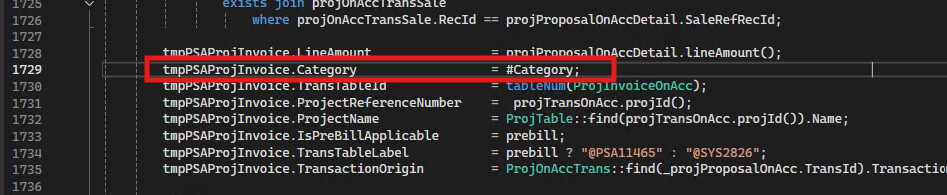
More specifically, when processing the on-account transactions, the On-account Category is currently populated with an empty macro value in the data provider, even though the category is correctly defined for the transaction.
As a workaround, we recommend extending the PSAProjInvoiceDP class and populating the Category with the appropriate value (On-account).
Once the category is correctly populated by the data provider, it becomes available in the report data source and is displayed correctly in both the standard SSRS report and the Docentric report template .
This also means that no changes are required to the report template itself.