Hello,
I’m testing Docentric 3.5.1.2 but I’m not sure to understand the new attachment rules functionalities.
I was very interested because users asked for merging genereted invoices with pdf attachments. But I don’t find a way to make it work this way.
I tested all options in “Print as” field with “File” print destination :
“Separate attachment” : generate a ZIP who contains the pdf invoice and an “Attachment” folder with the pdf attachment inside.
“PDF attachment” and “Merged attachment” : generate the invoice without attachments.
Is there something I missed?
Thank you all for your help and best regards,
B.
Hi @batthebarge ,
Welcome to our community, and thank you for your question. Also, apologies for the delay in getting back to you.
The PDF attachment option works only when the report output format is PDF. Could you please check which output format is selected in your File print destination?
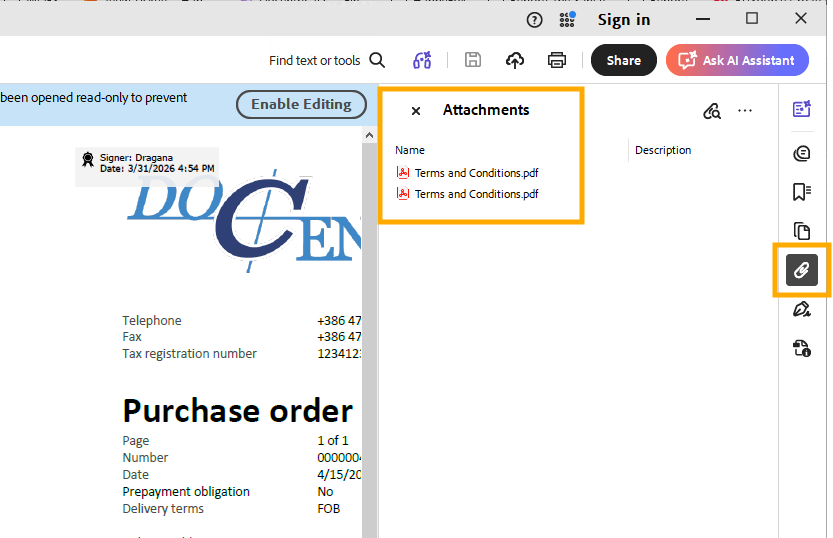
When configured correctly, the generated PDF file should contain the main document with the attachment embedded, for example as shown below:
Regarding the Merged attachment option: it is applicable only when the output report format is PDF and the attachments are PDF, Word, or Excel files. Word and Excel files are automatically converted to PDF during the merging process.
If you set Skip with warning in the If not valid output format column, you should receive additional information after running the report, which can help identify why the rule was skipped.
Let us know how it goes.
Wishing you a lovely day!
1 Like