
Say you have a set of records where each item holds its own date, and you want to show just the earliest or the latest date from the whole collection of data. For example, a list of sales lines where each line has a delivery date, and you want the first and last delivery date to appear on your document.
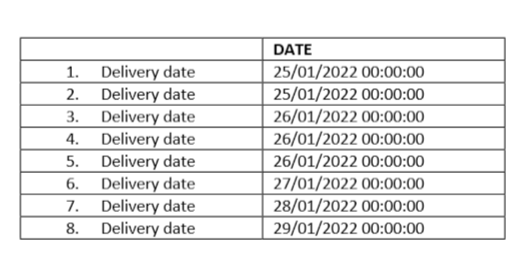
This could be handled quite simply by using the Summary Field tagging element in the Docentric AX designer. Here is how to do it.
Step 1 – Insert a Summary Field
Place a Summary Field tagging element where you want the date to appear.
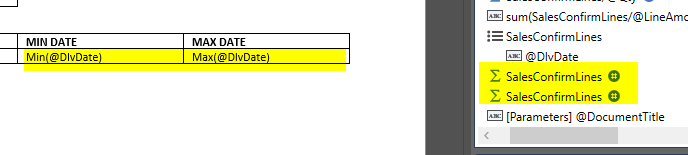
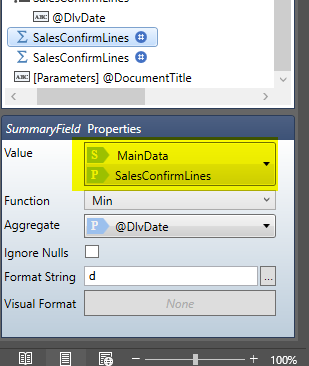
Step 2 – Set the Value to your collection
In the Summary Field properties, set the Value binding to the collection that holds your rows. In my example this is SalesConfirmLines. Make sure this points at the collection, not a single record, otherwise there is nothing to aggregate over.
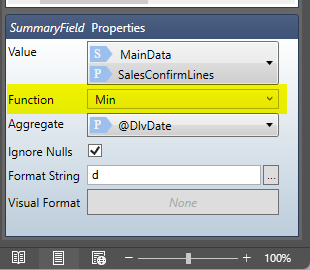
Step 3 – Choose the Function
Set the Function property. This is where the work happens:
Choose Min to get the earliest date
Choose Max to get the latest date
Step 4 – Set the Aggregate field
Set the Aggregate property to the actual date field you want to evaluate, for example @DlvDate.
Step 5 – Format the result
Set a Format String if you want a clean date, for example d or dd/MM/yyyy. Without it you may see the full date and time.

That is the whole thing. One Summary Field with the Function set to Min gives you the earliest date, and a second one set to Max gives you the latest.