
The customer had the following problem:
The customer reported that they had configured the System email template for Alert summary email as shown in the image below:
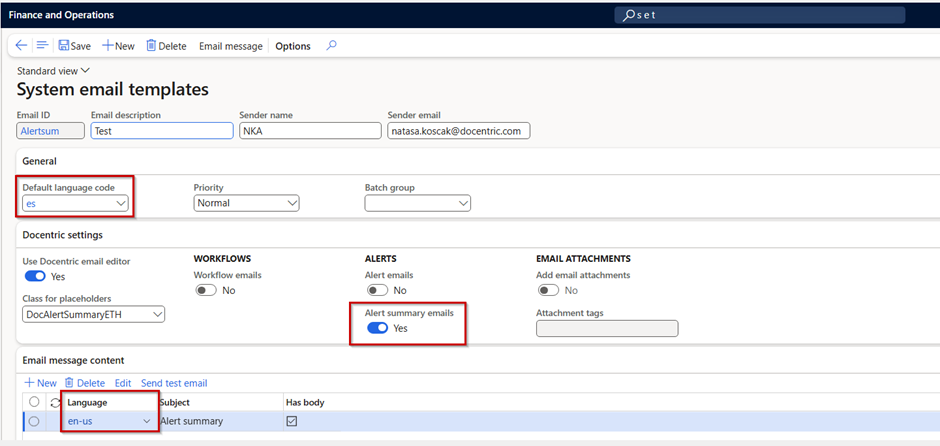
They configured the Alert rule correctly to get Alert Summary Emails, but the email was not generated. What is the problem ?
Problem context
The Alert summary email distributor job collects alert notifications and generates an alert email notification for them. The email body is taken from the System Email Template selected on the form setup of the batch job.
The way the system checks the language defined for the Email message content and the language defined in D365FO is described in the following topic.
Language Resolution Logic
Based on the logic defined in the pipeline, the system determines the language and then compares it with the language selected for the Email message content on the System email template selected on the form setup of the batch job. The language selection priority is as follows:
-
Legal entity: This is the language defined on the legal entity where the job is running.
-
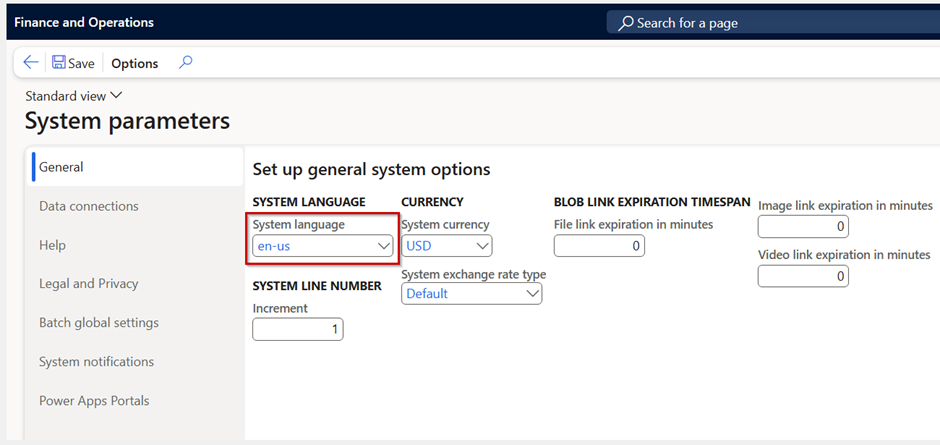
System language: This is the language defined in D365FO in the menu System parameters → General, as shown in the image below:
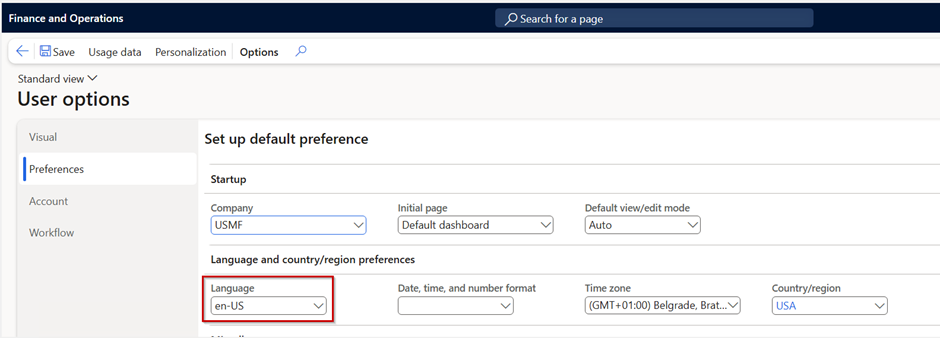
- User language: This is the language defined in the Standard D365F&O menu, User options → Preferences for the currently logged-in user and the user who runs the Alert summary email distributor job.
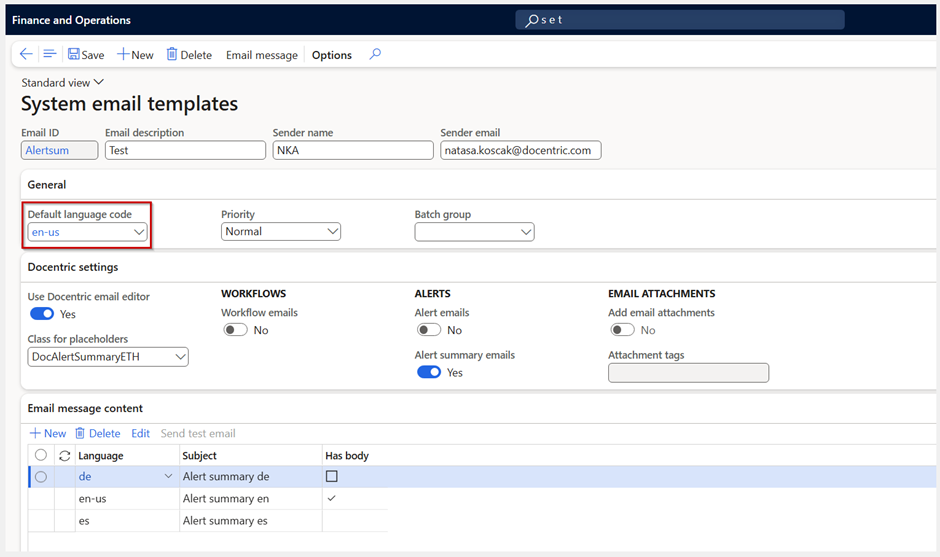
- Default language code ; It is defined on the System email template, as shown in the picture below:
If the selected language matches the language of the email body, a summary email will be generated. Otherwise, the email will not be generated.
Multiple Email Bodies
It is important to note that multiple email bodies can be defined, each with a different language and body, as shown in the image below.
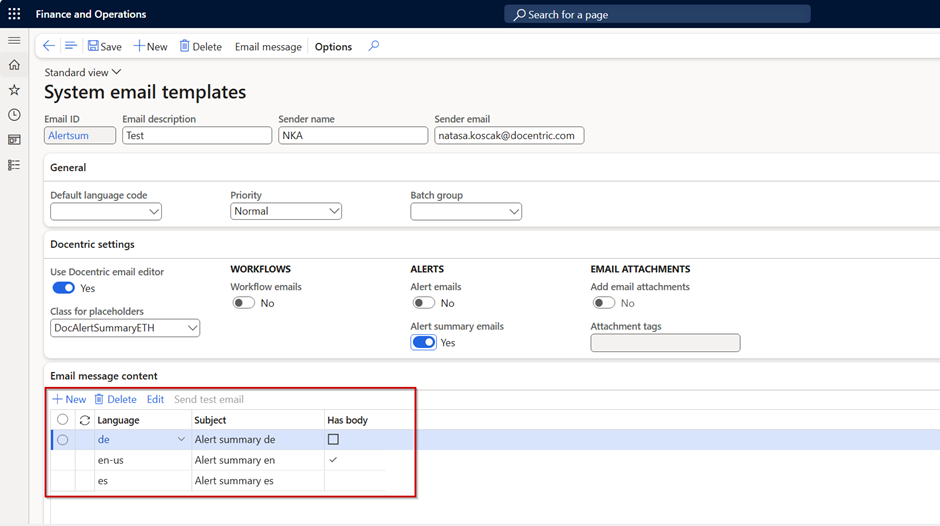
In such cases, the same language resolution process is repeated for each available email body until a valid match is found.
Resolution of the Customer Issue
In the customer’s scenario, the Alert summary email distributor job was executed in a legal entity with Spanish (ES) defined as the legal entity language.
Based on this, we advised the customer to configure the System Email Template with Email message content in Spanish, as shown in the provided setup.
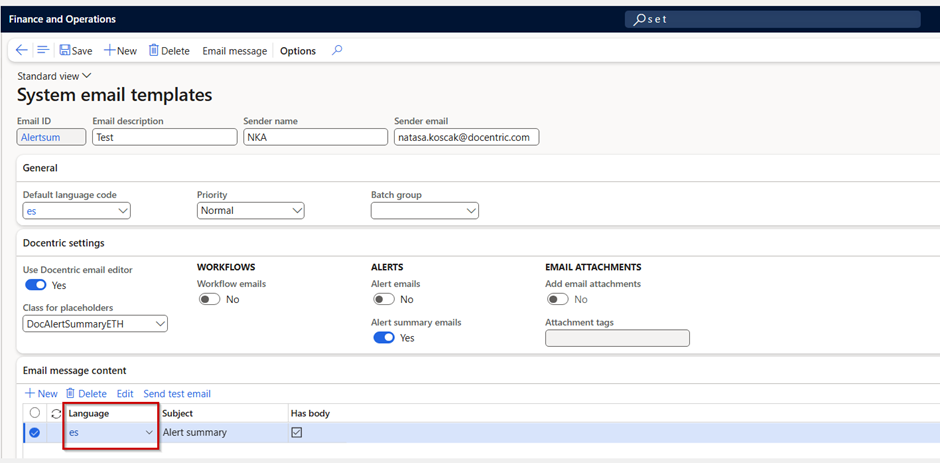
With this configuration, the email was successfully generated .
What If a System or Organization Email Template Is Used in an Alert Rule?
A common follow-up question is: What happens when a System email template or an Organization email template is selected for an alert rule to generate alert email notifications?
System Email Templates in Alert Rules
System email templates are used for alert rules that are not legal-entity specific, but are defined at the system level (Organization-wide = Yes on the alert rule). Therefore, the same language resolution rules described earlier apply. The system evaluates the available email bodies using the previously explained priority logic. No additional or special behavior is introduced for system-level alert rules.
Organization Email Templates in Alert Rules
When an Organization email template is used, and the alert rule is configured to use it, the following language selection priority logic is applied:
- Legal entity: This is the language defined on the legal entity where the alert rule is defined.
- System language
- User language
- Default language code
If the selected language matches the language of the email body, alert email notification will be generated. Otherwise, the email will not be generated.
Multiple Email Bodies
As with system email templates, it is possible to define multiple email bodies with different languages. In such cases, the same language resolution process is repeated. Each available email body is evaluated until a valid match is found.
Important Note
If the email logic has been customized in code and custom language rules are implemented in the pipeline, these rules may no longer apply.
In that case, the email body language depends entirely on the custom implementation, not on the standard system logic described in this post.
Conclusion
Getting alert summary emails or alert email notifications to work correctly in the right language can be tricky at first, but once you understand the priority order — Legal Entity → System → User → Default template language — it becomes much easier to manage.
Make sure your email templates match the language of your legal entity or system context, and emails will be generated reliably. And if your environment has customizations, just double-check the logic there.
With these steps, you can take control of your alert emails and avoid unexpected issues, making sure notifications reach your users exactly as intended.