
Running Docentric and Bottomline PrecisionForms in the Same D365FO Environment
We recently came across a customer who wanted to run both Docentric and Bottomline PrecisionForms in the same Dynamics 365 Finance and Operations (D365FO) environment.
While both products offer similar capabilities, this scenario is not as unusual as it might sound. For example, companies that have merged or been acquired may already use different reporting solutions, or they may want to run both products in parallel while migrating from one solution to the other.
Based on our limited testing, it is possible to run both products in the same environment, but there are some important considerations when configuring Print management.
How Docentric handles print destinations
When configuring Print management for a document, such as a Sales invoice, Docentric extends the standard D365FO Print destination settings with additional capabilities, including more advanced document distribution and storage options.
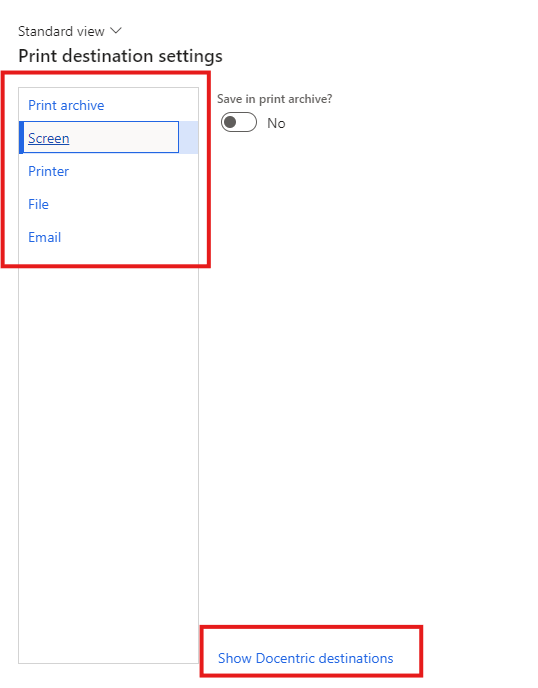
When configured to use both standard SSRS and Docentric destinations, users can switch between them using the Show Docentric destinations and Show SSRS destinations links.
Standard SSRS destinations:
Docentric destinations:
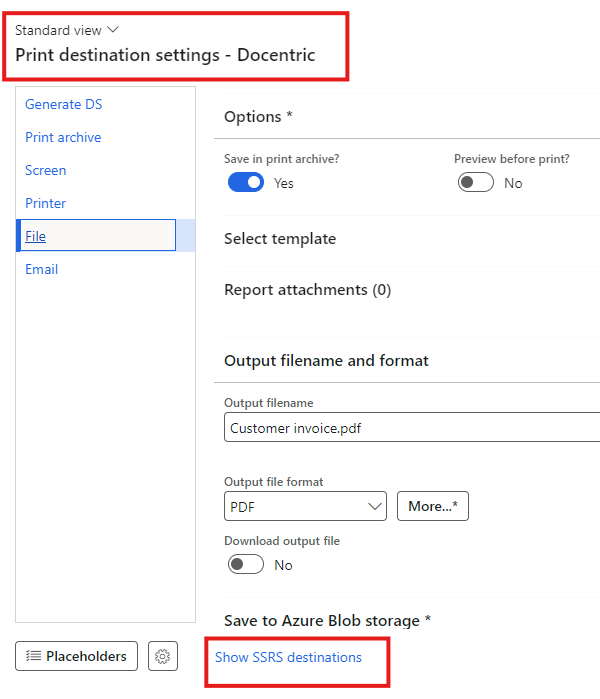
This allows users to configure either type of destination, depending on the customer’s reporting requirements.
How PrecisionForms handles print destinations
PrecisionForms takes a different approach.
Instead of displaying the standard SSRS destinations alongside its own, PrecisionForms replaces them with the destinations that the user is authorised to access.
It is also possible to enable or disable PrecisionForms processing for individual reports, similarly to Docentric.
However, there is an important difference in how PrecisionForms handles report execution.
When a report is enabled for PrecisionForms, but its Print management settings specify a non-PrecisionForms destination, PrecisionForms overrides that destination and redirects the output to its own Screen destination.
This behavior has an important implication when both products are installed.
What does this mean when using both products?
Consider a Sales invoice that is enabled for PrecisionForms.
Even if you configure its Print management settings to use a Docentric destination, PrecisionForms will override that selection during report execution.
As a result, you cannot simply select a Docentric destination and expect it to be used while PrecisionForms processing remains enabled for that report in that legal entity.
Based on our testing, the following rules apply:
| PrecisionForms enabled? | Configured destination | Result |
|---|---|---|
| No | Standard SSRS | Standard SSRS destination is used |
| No | Docentric | Docentric destination is used |
| Yes | PrecisionForms | PrecisionForms destination is used |
| Yes | Standard SSRS | Redirected to PrecisionForms Screen |
| Yes | Docentric | Redirected to PrecisionForms Screen |
Conclusion
Docentric and PrecisionForms can coexist in the same D365FO environment, provided that report processing and print management are configured appropriately, and based on our limited testing they do not appear to clash. We did not conduct exhaustive testing and we cannot categorically say there is no clash - we just didn’t find any.
The key is to decide which solution should handle each report:
-
Standard SSRS or Docentric: Disable PrecisionForms processing for the report.
-
PrecisionForms: Enable PrecisionForms processing and use its supported destinations.
This means that customers do not necessarily have to choose one reporting solution for their entire D365FO environment. Both can be used in parallel, whether to support different reporting requirements or to facilitate a gradual migration from one solution to the other.
The important consideration is ensuring that their configurations do not conflict.
These findings are based on our limited testing with both products installed. We recommend that you validate the behavior with the specific product versions and configuration used in your environment.