
When creating or modifying Docentric templates, it is always best to have the report data source simplified, to keep the layout of the template clean and easy to maintain.
However, as that is not always possible, sometimes you need to make use of the various XPath functions to make adjustments and show the required result in your template.
One simple example could be this – instead of having some field with values across multiple records, you may have all those values inside a single string field, with the values concatenated and separated with a semicolon.
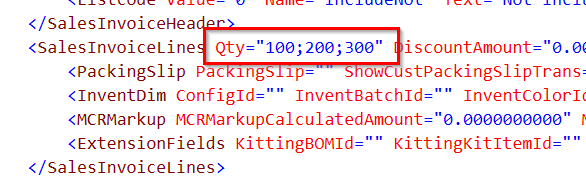
Now, you may want to make some aggregation with this, such as returning the sum of all the values in the string.
In that case, the string-split() function comes in handy, since it allows you to return a node set of strings that contains the substrings of the input string (first parameter) delimited by the specified string (third parameter). The Remove Empty Entries flag (second parameter) is set to True, so that all empty strings will be removed from the result.
string-split(@Qty, true(), “;”)
Now you can return the sum of all the elements in the newly created array by calling the sum() function on it.
sum(string-split(@Qty, true(), “;”))
This shows that, even though you don’t have the best structure for your report data source, it is still possible to perform most kinds of operations, with small adjustments.